云计算
课件地址:https://git\.inmind\-lab\.com/aaronxu/Cloud\-book
虚拟化
1.进行Linux的系统进行优化主要有一下几点:
Day 2
查看虚拟机的列表:
virsh list --all
[root@localhost ~]# virsh list --all
 Id   Name      State
--------------------------
 -    buyao     shut off
 -    buyao-1   shut off
 -    buyao-2   shut off

进行所有的虚拟机启动:
virsh list --all --autostart
进行单个的虚拟机启动:
virsh start buyao
进行防火墙的规则查看
firewall-cmd --list-all
配置桥接网络
网卡的显示,查看可以添加的网络接口
brctl show
[root@localhost ~]# brctl show
bridge name        bridge id                STP enabled        interfaces
docker0                8000.32abe37c5954        no
virbr0                8000.52540061198c        yes                vnet0
                                                        vnet1
                                                        vnet2
[root@localhost ~]# brctl delif virbr0 vnet0
[root@localhost ~]# brctl show
bridge name        bridge id                STP enabled        interfaces
docker0                8000.32abe37c5954        no
virbr0                8000.52540061198c        yes                vnet1
                                                        vnet2
可以看到虚拟机中的配置中,buyao这个机器使用的就是网卡的vnet0接口
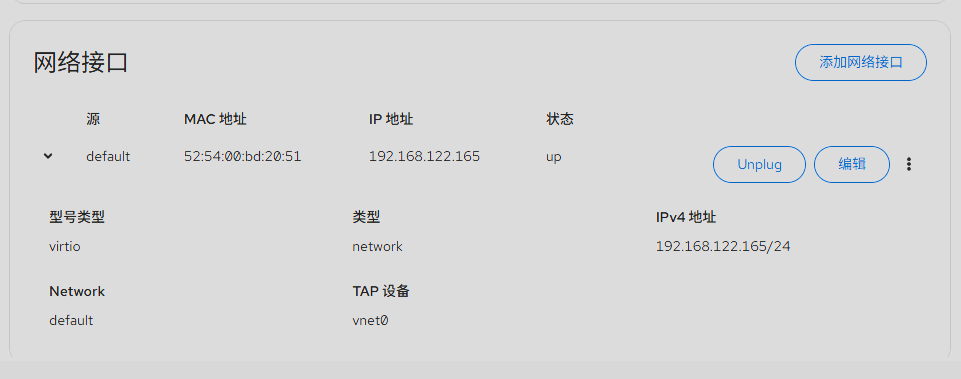
将网络的接口进行删除后的buyao机器无法进行联网
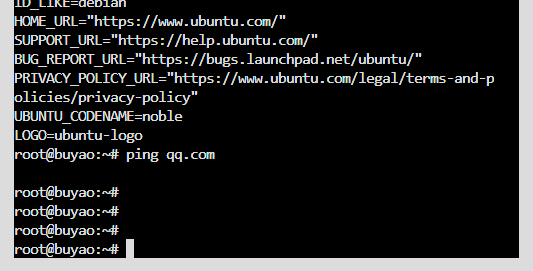
接下来要进行网络的桥接配置
nmcli connection add type bridge ifname br0 con-name br0
nmcli connection modify br0 ipv4.method auto ipv6.method ignore

nmcli connection add type ethernet ifname ens160 con-name br0-slave-ens160 master br0

nmcli connection modify ens160 connection.autoconnect no
nmcli connection modify br0-slave-ens160 no

nmcli connection down ens160
nmcli connection up br0
nmcli connection up br0-slave-ens160
然后进行受控机型的配置
[root@localhost ~]# virsh edit vm1
<interface type='bridge'>
        <mac address='52:54:00:63:99:c1'/>
        <source bridge='br0'/>
        <model type='virtio'/>
        <address type='pci' domain='0x0000' bus='0x00' slot='0x03' function='0x0'/>
</interface>

整体架构图
配置前:
物理机 ens160 (IP: 192.168.x.x)
     │
     ├── virbr0 (NAT, 192.168.122.1)
     │      └── vnet0 (虚拟机)
     └── docker0 (172.17.0.1)

配置后:
物理机 ens160 (无IP)
     │
     └── br0 (IP: 192.168.x.x, DHCP)
            ├── ens160 (物理网卡,出口)
            ├── vnet0 (虚拟机,获得独立IP)
            └── vnet1 (其他虚拟机)
注意,物理网卡在这样操作后,ens160就会被挂到br0桥下,原本ens160的IP地址会丢失,br0桥的虚拟接口会获得原
本的IP。
在完成桥接网络的配置后要进行还原
 nmcli connection down br0-slave-ens160
nmcli connection down br0
nmcli connection delete br0-slave-ens160
nmcli connection delete br0

nmcli connection modify ens160 connection.autoconnect yes
nmcli connection up ens160
步骤流程图
删除前:
┌─────────────────────────────────────────┐
│  br0 (192.168.1.100)                    │
│    ├── br0-slave-ens160                 │
│    │     └── ens160 (物理网卡)           │
│    └── virbr0 (虚拟网桥, NAT用)          │
└─────────────────────────────────────────┘

删除后:
┌─────────────────────────────────────────┐
│  ens160 (物理网卡, 独立工作)             │
│    └── 正常获取IP, 连接外网              │
└─────────────────────────────────────────┘
配置NAT网络
1.复制默认的NAT网络配置
[root@localhost ~]# cd /etc/libvirt/qemu/networks/
[root@localhost networks]# cp default.xml nat1.xml
2.进行配置文件的修改
[root@localhost networks]# vim nat1.xml
<!--
WARNING: THIS IS AN AUTO-GENERATED FILE. CHANGES TO IT ARE LIKELY TO BE
OVERWRITTEN AND LOST. Changes to this xml configuration should be made using:
  virsh net-edit nat1
or other application using the libvirt API.
-->

<network>
  <name>nat1</name>
  <uuid>6dcf6802-c0df-47a8-8f03-18f176150669</uuid>
  <forward mode='nat'/>
  <bridge name='virbr1' stp='on' delay='0'/>
  <mac address='52:54:00:61:19:7c'/>
  <ip address='192.168.66.1' netmask='255.255.255.0'>
    <dhcp>
      <range start='192.168.66.2' end='192.168.66.254'/>
    </dhcp>
  </ip>
</network>
3.配置完成后进行重启libvirtd服务,然后重新激活新的nat网络
[root@localhost networks]# systemctl restart libvirtd
[root@localhost networks]# virsh net-define nat1.xml
[root@localhost ~]# virsh net-autostart nat1
网络nat1标记为自动启动
[root@localhost ~]# virsh net-start nat1
网络 nat1 已开始
[root@localhost ~]# virsh net-list
 名称               状态     自动开始  持久
----------------------------------------------------------
 default              活动     是           是
 nat1                 活动     是           是
 4.若想要之前配置桥接网络的buyao机器正常开机,则要进行虚拟机的网络配置
 virsh edit buyao
 <interface type='network'>
  <mac address='52:54:00:63:99:c1'/>
  <source network='nat1'/>         <!-- ✅ 改为 nat1 网络 -->
  <model type='virtio'/>
</interface>
配置隔离网络
恢复默认的NAT网络配置
cd /etc/libvirt/qemu/networks/
cp default.xml isolate1.mxl
vim isolate1.xml
<!--
WARNING: THIS IS AN AUTO-GENERATED FILE. CHANGES TO IT ARE LIKELY TO BE
OVERWRITTEN AND LOST. Changes to this xml configuration should be made using:
  virsh net-edit isolate1
or other application using the libvirt API.
-->

<network>
  <name>isolate1</name>
  <uuid>6dcf6802-c0df-47a8-8f03-18f176150660</uuid>
  <bridge name='virbr2' stp='on' delay='0'/>
  <mac address='52:54:00:61:19:81'/>
  <ip address='192.168.77.1' netmask='255.255.255.0'>
    <dhcp>
      <range start='192.168.77.2' end='192.168.77.254'/>
    </dhcp>
  </ip>
</network>
~
~
~
如果和default的网络配置有冲突,就将
建新网络时,三个标识必须完全唯一且差异足够大:

配置项        要求
UUID        完全不同(不能只差一两位)
MAC        完全不同
IP 网段        与现有网络不重叠
你的新配置把三者都换了,所以成功了。
进行更换,就可以成功。
最后可以进行查看
brctl show
Docker容器
Docker是什么
Docker是一个在2013年开源的应用程序,并且是一个基于go语言编写的PAAS服务。
Docker最早采用LXC技术,之后改为自己研发并开源的runc技术运行容器。
Docker相比虚拟机的交付速度更快,资源消耗更低,Docker采用客户端、服务端架构,使用远程api来管理和创建Docker容器。
Docker的三大理念是build(构建)、ship(运输)、run(运行)。
Docker通过namespace、cgroup等技术来提供容器的资源隔离与安全保障。
Docker和虚拟机之间的对比
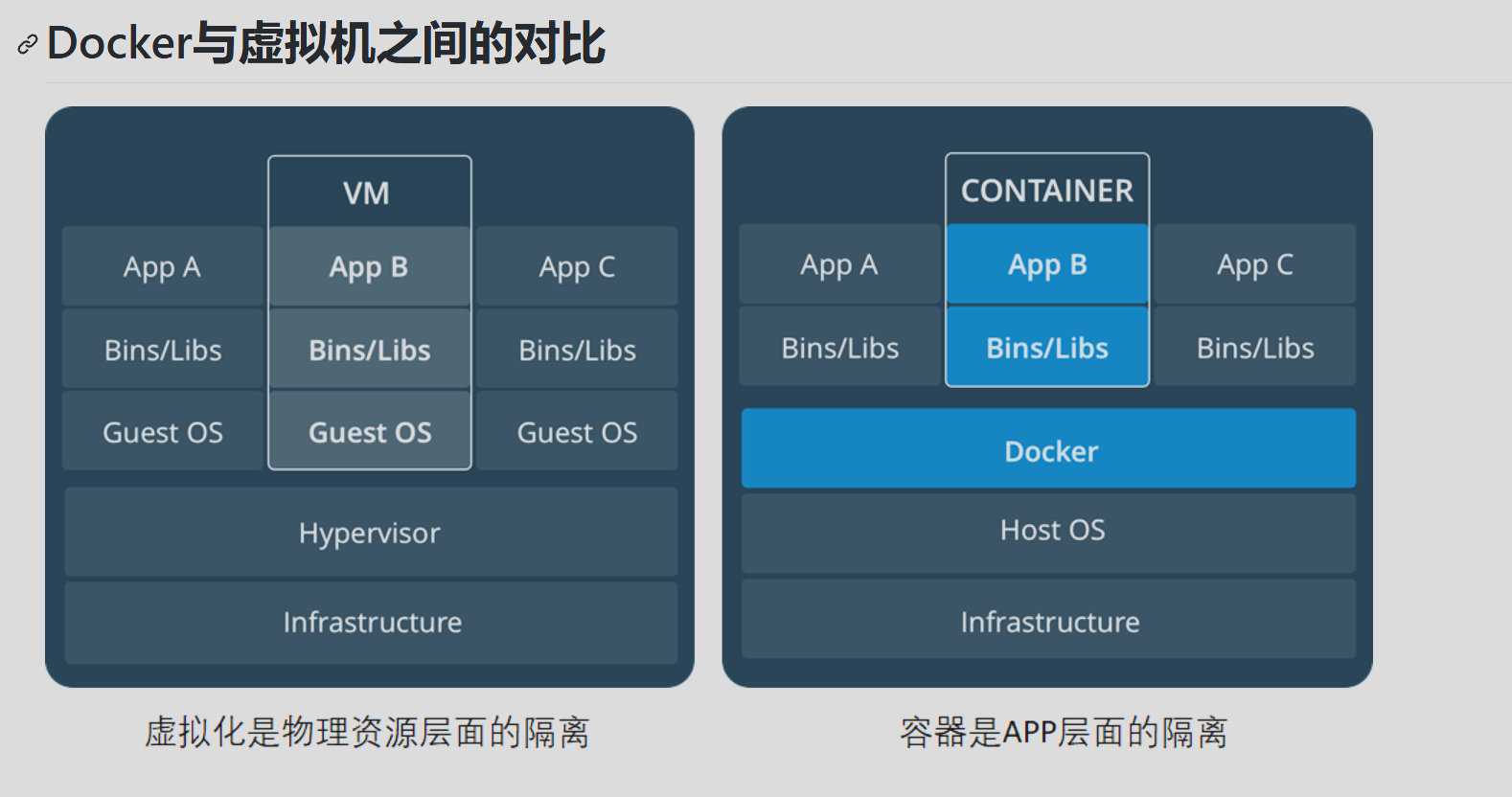
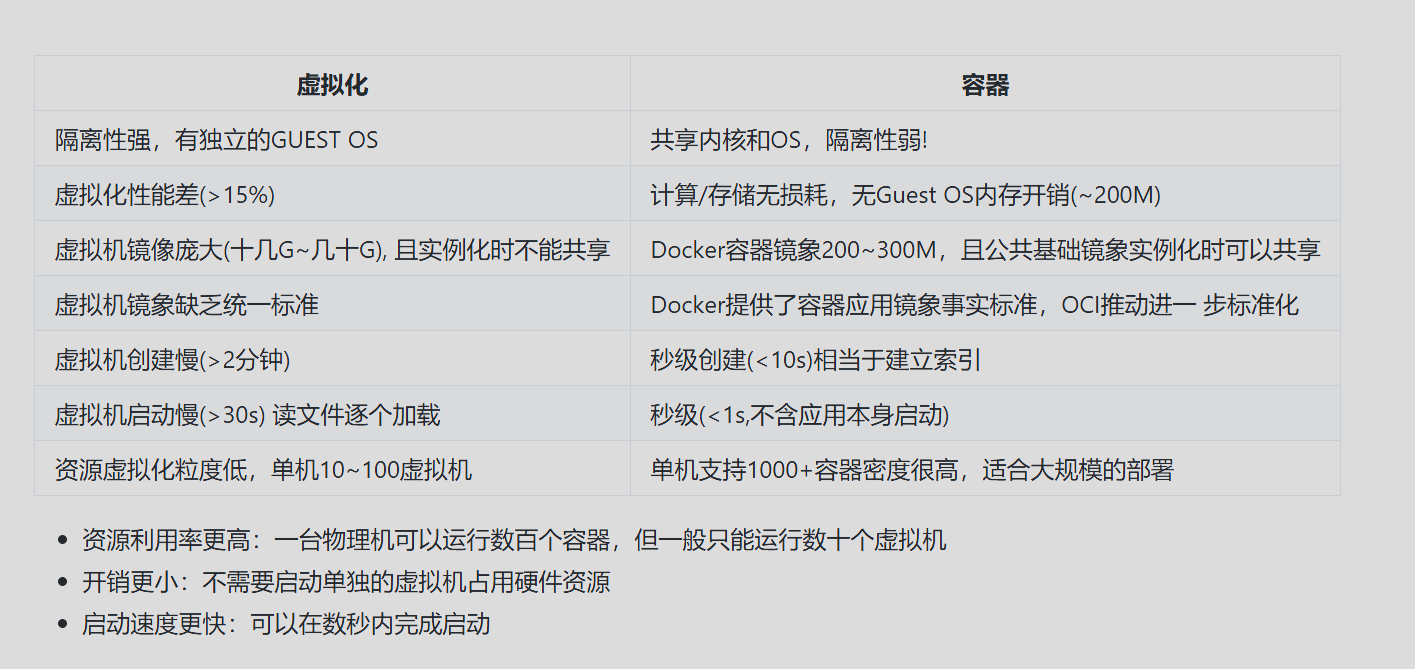
Docker的组成
Docker主机 host:一个物理机或者虚拟机,用于运行docker服务进程和容器
Docker服务端 Server:Docker守护进程,运行docker容器
Docker客户端 client:客户端使用docker命令或其他工具调用docker api
Docker仓库 registry:保存镜像的仓库,类似于git或svn这样的版本控制器
Docker镜像 images:镜像可以理解为创建实例使用的模板
Docker容器 container:容器是从镜像生成对外提供服务的一个或一组服务
Docker的安装
安装docker-ce
[root@localhost ~]# yum install -y yum-utils
[root@localhost ~]# yum-config-manager --add-repo https://mirrors.aliyun.com/docker-ce/linux/centos/docker-ce.repo
[root@localhost ~]# sed -i 's+download.docker.com+mirrors.aliyun.com/docker-ce+' /etc/yum.repos.d/docker-ce.repo
[root@localhost ~]# yum install docker-ce -y
启动docker
[root@localhost ~]# systemctl enable --now docker
Created symlink /etc/systemd/system/multi-user.target.wants/docker.service → /usr/lib/systemd/system/docker.service.
[root@localhost ~]# systemctl status docker
● docker.service - Docker Application Container Engine
     Loaded: loaded (/usr/lib/systemd/system/docker.service; enabled; preset: disabled)
     Active: active (running) since Sun 2025-03-23 23:36:27 CST; 10s ago
TriggeredBy: ● docker.socket
       Docs: https://docs.docker.com
   Main PID: 29081 (dockerd)
      Tasks: 10
     Memory: 25.7M
        CPU: 141ms
     CGroup: /system.slice/docker.service
             └─29081 /usr/bin/dockerd -H fd:// --containerd=/run/containerd/containerd.sock
镜像配置加速
由于Docker Image仓库在国外,目前,从23年底开始,国内陆续访问不到了,所以要通过一些镜像加速器才能获取到镜像

[root@localhost ~]# docker pull nginx
Error response from daemon: Get "https://registry-1.docker.io/v2/": context deadline exceeded

# 无法从docker官方镜像仓库,docker.io获取镜像
使用国内的镜像加速
[root@localhost ~]# mkdir -p /etc/docker
[root@localhost ~]# vim /etc/docker/daemon.json
{
  "registry-mirrors": [
    "https://docker.m.daocloud.io"
  ]
}

# 重启容器服务
[root@localhost ~]# systemctl daemon-reload
[root@localhost ~]# systemctl restart docker

# 可选加速地址(不一定有用,随时会跑路):
1、https://docker.m.daocloud.io
2、https://docker.1panelproxy.com
3、https://atomhub.openatom.cn
4、https://docker.1panel.live
5、https://dockerhub.jobcher.com
6、https://hub.rat.dev
7、https://docker.registry.cyou
8、https://docker.awsl9527.cn
9、https://do.nark.eu.org/
10、https://docker.ckyl.me
11、https://hub.uuuadc.top
12、https://docker.chenby.cn
13、https://docker.ckyl.me


# 实在不行的话,可以在拉去的时候手动加上镜像加速器,因为有时候写到daemon.json中也有可能访问不到
[root@localhost ~]# docker pull nginx
[root@localhost ~]# docker pull docker.m.daocloud.io/nginx
[root@localhost ~]# docker images
REPOSITORY   TAG       IMAGE ID       CREATED       SIZE
nginx        latest    53a18edff809   6 weeks ago   192MB
Docker的快速开始
[root@localhost ~]# docker pull nginx
[root@localhost ~]# docker images
REPOSITORY   TAG       IMAGE ID       CREATED      SIZE
nginx        latest    d1a364dc548d   5 days ago   133MB
[root@localhost ~]# docker run -d -p 80:80 nginx
e617ca1db9a5d242e6b4145b9cd3dff9f7955c6ab1bf160f13fb6bec081a29e4
[root@localhost ~]# docker ps
CONTAINER ID   IMAGE     COMMAND                  CREATED         STATUS         PORTS                               NAMES
e617ca1db9a5   nginx     "/docker-entrypoint.…"   6 seconds ago   Up 5 seconds   0.0.0.0:80->80/tcp, :::80->80/tcp   intelligent_turing
[root@localhost ~]# docker exec -it e617ca1db9a5 bash
root@e617ca1db9a5:/# cd /usr/share/nginx/html/
root@e617ca1db9a5:/usr/share/nginx/html# ls
50x.html  index.html
root@e617ca1db9a5:/usr/share/nginx/html# echo 'docker nginx test' > index.html
[root@localhost ~]# curl 192.168.88.10
docker nginx test

[root@admin ~]# docker ps
CONTAINER ID   IMAGE     COMMAND                   CREATED                                                        NAMES
e0a818c40b7e   nginx     "/docker-entrypoint.…"   About an hour ago  0.0.0.0:9000->9000/tcp, :::9000->9000/tcp   determined_sanderson
9b066ef4bcd2   nginx     "/docker-entrypoint.…"   About an hour ago  90->80/tcp, :::90->80/tcp                   vigorous_hypatia
[root@admin ~]# docker stop e0a818c40b7e
e0a818c40b7e
[root@localhost ~]# docker ps

CONTAINER ID   IMAGE     COMMAND   CREATED   STATUS    PORTS     NAMES


进入虚拟机
virsh console buyao
[root@localhost ~]# virsh console buyao
Connected to domain 'buyao'
Escape character is ^] (Ctrl + ])

root@buyao:~#
root@buyao:~#
root@buyao:~#
root@buyao:~# ping qq.com
PING qq.com (112.60.14.252) 56(84) bytes of data.
64 bytes from 112.60.14.252: icmp_seq=1 ttl=127 time=50.4 ms
64 bytes from 112.60.14.252: icmp_seq=2 ttl=127 time=43.8 ms

--- qq.com ping statistics ---
2 packets transmitted, 2 received, 0% packet loss, time 1013ms
rtt min/avg/max/mdev = 43.824/47.125/50.427/3.301 ms
root@buyao:~#
root@buyao:~#


进入容器中
docker ps -a
docker start d2c
docker exec -it d2c bash
[root@localhost ~]# docker ps -a
CONTAINER ID   IMAGE     COMMAND                  CREATED         STATUS             PORTS                                     NAMES
d2cd5e7c3fb8   nginx     "/docker-entrypoint.…"   5 minutes ago   Up 5 minutes       0.0.0.0:80->80/tcp, [::]:80->80/tcp       agitated_solomon
118e6ebdd396   nginx     "/docker-entrypoint.…"   2 weeks ago     Up About an hour   0.0.0.0:8080->80/tcp, [::]:8080->80/tcp   nginx_container_test
[root@localhost ~]# docker start d2c
d2c
[root@localhost ~]# docker exec -it d2c bash
容器就是一个隔离的进程

拉取镜像rockylinux:9.3
docker pull rockylinux:9.3
[root@localhost ~]# docker ps -a
CONTAINER ID   IMAGE            COMMAND                  CREATED              STATUS                      PORTS     NAMES
51e9c49e4598   rockylinux:9.3   "bash"                   56 seconds ago       Exited (0) 43 seconds ago             sweet_perlman
b399c91856c9   rockylinux:9.3   "bash"                   About a minute ago   Up About a minute                     elegant_haibt
d2cd5e7c3fb8   nginx            "/docker-entrypoint.…"   29 minutes ago       Exited (0) 7 minutes ago              agitated_solomon
118e6ebdd396   nginx            "/docker-entrypoint.…"   2 weeks ago          Exited (0) 7 minutes ago              nginx_container_test
进入到镜像中
[root@localhost ~]# docker run -it rockylinux:9.3 bash
[root@08848d5a4355 /]# vi lyq.txt
[root@08848d5a4355 /]# exit
exit
在宿主机中可以查看有容器中的进程:lyq.txt
[root@localhost ~]# ps aux |grep lyq.txt
root       18397  0.0  0.0 222200  2216 pts/2    S+   04:16   0:00 grep --color=auto lyq.txt
Docker 镜像运行 centos:7
docker pull centos:7
docker ps -a
docker images
docker run -it --name centos:7 /bin/bash
[root@localhost ~]# docker rm centos7    //如果容器运行不成功,就删掉重新下载
centos7
[root@localhost ~]# docker run -it --name centos7 centos:7 /bin/bash
[root@79c7dae7b7fa /]#
[root@79c7dae7b7fa /]#
[root@79c7dae7b7fa /]#
[root@79c7dae7b7fa /]#
[root@79c7dae7b7fa /]#
[root@79c7dae7b7fa /]#
[root@79c7dae7b7fa /]# ping qq.com
PING qq.com (111.33.167.71) 56(84) bytes of data.
64 bytes from 111.33.167.71 (111.33.167.71): icmp_seq=1 ttl=127 time=30.3 ms
64 bytes from 111.33.167.71 (111.33.167.71): icmp_seq=2 ttl=127 time=27.7 ms
^C
--- qq.com ping statistics ---
2 packets transmitted, 2 received, 0% packet loss, time 1015ms
rtt min/avg/max/mdev = 27.765/29.048/30.331/1.283 ms
Docker容器的基本操作
[root@localhost ~]# docker run centos:7
[root@localhost ~]# docker ps -a
CONTAINER ID   IMAGE            COMMAND                  CREATED         STATUS                     PORTS     NAMES
48fcb378d0af   centos:7         "/bin/bash"              9 seconds ago   Exited (0) 8 seconds ago             confident_haslett
ad76cfdb4c94   centos:7         "ping 127.0.0.1"         6 minutes ago   Exited (0) 5 minutes ago             pensive_sammet
5952682bbe30   centos:7         "/bin/bash"              9 minutes ago   Exited (0) 9 minutes ago             suspicious_yonath
79c7dae7b7fa   centos:7         "/bin/bash"              10 days ago     Exited (255) 9 hours ago             centos7
08848d5a4355   rockylinux:9.3   "bash"                   10 days ago     Exited (0) 10 days ago               recursing_mendel
51e9c49e4598   rockylinux:9.3   "bash"                   10 days ago     Exited (0) 10 days ago               sweet_perlman
b399c91856c9   rockylinux:9.3   "bash"                   10 days ago     Exited (255) 9 hours ago             elegant_haibt
d2cd5e7c3fb8   nginx            "/docker-entrypoint.…"   10 days ago     Exited (0) 10 days ago               agitated_solomon
118e6ebdd396   nginx            "/docker-entrypoint.…"   3 weeks ago     Exited (0) 10 days ago               nginx_container_test
在开启后无任务,就会将容器关闭
可以尝试在后台运行不能被结束的进程
docker run -d centos:7 ping qq.com
[root@localhost ~]# docker ps -a
CONTAINER ID   IMAGE            COMMAND                  CREATED          STATUS                      PORTS     NAMES
3504d0862db4   centos:7         "ping qq.com"            29 seconds ago   Up 29 seconds                         zealous_banach
48fcb378d0af   centos:7         "/bin/bash"              13 minutes ago   Exited (0) 13 minutes ago             confident_haslett
ad76cfdb4c94   centos:7         "ping 127.0.0.1"         19 minutes ago   Exited (0) 18 minutes ago             pensive_sammet
5952682bbe30   centos:7         "/bin/bash"              22 minutes ago   Exited (0) 22 minutes ago             suspicious_yonath
79c7dae7b7fa   centos:7         "/bin/bash"              10 days ago      Exited (255) 10 hours ago             centos7
08848d5a4355   rockylinux:9.3   "bash"                   10 days ago      Exited (0) 10 days ago                recursing_mendel
51e9c49e4598   rockylinux:9.3   "bash"                   10 days ago      Exited (0) 10 days ago                sweet_perlman
b399c91856c9   rockylinux:9.3   "bash"                   10 days ago      Exited (255) 10 hours ago             elegant_haibt
d2cd5e7c3fb8   nginx            "/docker-entrypoint.…"   10 days ago      Exited (0) 10 days ago                agitated_solomon
118e6ebdd396   nginx            "/docker-entrypoint.…"   3 weeks ago      Exited (0) 10 days ago                nginx_container_test
[root@localhost ~]# docker run -itd centos:7
27d6963d12993a5a9d02340c92df781fb7424fd0289264dc2d7cdbee38eeec0d
[root@localhost ~]# docker ps -a
CONTAINER ID   IMAGE            COMMAND                  CREATED          STATUS                      PORTS     NAMES
27d6963d1299   centos:7         "/bin/bash"              8 seconds ago    Up 8 seconds                          compassionate_shamir
3504d0862db4   centos:7         "ping qq.com"            5 minutes ago    Up 5 minutes                          zealous_banach
48fcb378d0af   centos:7         "/bin/bash"              18 minutes ago   Exited (0) 18 minutes ago             confident_haslett
ad76cfdb4c94   centos:7         "ping 127.0.0.1"         24 minutes ago   Exited (0) 23 minutes ago             pensive_sammet
5952682bbe30   centos:7         "/bin/bash"              27 minutes ago   Exited (0) 27 minutes ago             suspicious_yonath
79c7dae7b7fa   centos:7         "/bin/bash"              10 days ago      Exited (255) 10 hours ago             centos7
08848d5a4355   rockylinux:9.3   "bash"                   10 days ago      Exited (0) 10 days ago                recursing_mendel
51e9c49e4598   rockylinux:9.3   "bash"                   10 days ago      Exited (0) 10 days ago                sweet_perlman
b399c91856c9   rockylinux:9.3   "bash"                   10 days ago      Exited (255) 10 hours ago             elegant_haibt
d2cd5e7c3fb8   nginx            "/docker-entrypoint.…"   10 days ago      Exited (0) 10 days ago                agitated_solomon
118e6ebdd396   nginx            "/docker-entrypoint.…"   3 weeks ago      Exited (0) 10 days ago                nginx_container_test
在后台使用 docker run -itd 即使没有进行指令的进程也可以保持后台的留存
docker rm -f `docker ps -qa`  进行所有的容器的删除
[root@localhost ~]# docker ps -a
CONTAINER ID   IMAGE      COMMAND               CREATED          STATUS                      PORTS     NAMES
015dfadf4797   centos:7   "ping -c 10 qq.com"   21 seconds ago   Exited (0) 11 seconds ago             relaxed_black
在任务结束后还会有大量的容器残留,可以使用 docker run -d --rm ****进行一次性的容器进程
[root@localhost ~]# docker run -d --rm centos:7 ping -c 10 qq.com
74023a2b70b756202385feba28a279def1c180c1743cf79813c3049528e8a85e
[root@localhost ~]# docker ps -a
CONTAINER ID   IMAGE      COMMAND               CREATED         STATUS                     PORTS     NAMES
74023a2b70b7   centos:7   "ping -c 10 qq.com"   7 seconds ago   Up 6 seconds                         sweet_snyder
015dfadf4797   centos:7   "ping -c 10 qq.com"   3 minutes ago   Exited (0) 3 minutes ago             relaxed_black
[root@localhost ~]# docker ps -a
CONTAINER ID   IMAGE      COMMAND               CREATED         STATUS                     PORTS     NAMES
015dfadf4797   centos:7   "ping -c 10 qq.com"   3 minutes ago   Exited (0) 3 minutes ago             relaxed_black
Docker 镜像的制作
[root@localhost ~]# docker images
                                                                                             i Info →   U  In Use
IMAGE            ID             DISK USAGE   CONTENT SIZE   EXTRA
centos:7         be65f488b776        299MB         76.1MB    U
mynginx:latest   ec4ed8b5299e        238MB           66MB
nginx:latest     ec4ed8b5299e        238MB           66MB
rockylinux:9.3   d7be1c094cc5        260MB         68.9MB
[root@localhost ~]#
docker run -it rockylinux:9.3
[root@531d7fafe5d6 /]# yum -y install nginx
vim /etc/nginx/nginx.conf
daemon off;
yun -y install vim
[root@531d7fafe5d6 /]# echo "lalala" > /usr/share/nginx/html/index.html
echo "lalala" > /usr/share/nginx/html/index.html
exit
在退出镜像后,查看原来的镜像
[root@localhost ~]# docker ps -a
CONTAINER ID   IMAGE            COMMAND               CREATED       STATUS                      PORTS     NAMES
531d7fafe5d6   rockylinux:9.3   "/bin/bash"           4 hours ago   Exited (0) 10 seconds ago             compassionate_dijkstra
d0f8abdca90b   centos:7         "/bin/bash"           4 hours ago   Exited (127) 4 hours ago              great_colden
015dfadf4797   centos:7         "ping -c 10 qq.com"   4 hours ago   Exited (0) 4 hours ago                relaxed_black
将原来进行nginxs配置的容器进行重命名和更改
[root@localhost ~]# docker commit -a "lyq" -m "nginx server v1" 531d7fafe5d6 rocky_nginx:v1
sha256:17273b31781ca6250abc70d9e902152ccd44c90657df27d041fe8c92a51d66e6
[root@localhost ~]# docker images
查看进行更改后提交的容器                                                                                             i Info →   U  In Use
IMAGE            ID             DISK USAGE   CONTENT SIZE   EXTRA
centos:7         be65f488b776        299MB         76.1MB    U
mynginx:latest   ec4ed8b5299e        238MB           66MB
nginx:latest     ec4ed8b5299e        238MB           66MB
rocky_nginx:v1   17273b31781c        478MB          144MB
rockylinux:9.3   d7be1c094cc5        260MB         68.9MB    U
进行镜像的后台运行,-p 是进行端口的映射,将虚拟机的80端口映射外面显示机器的80端口
docker run -d -p 80:80 --name my_nginx rocky_nginx:v1 /usr/sbin/nginx
[root@localhost ~]# docker run -d -p 80:80 --name my_nginx rocky_nginx:v1 /usr/sbin/nginx
27bad0ca9b3c25d91568b690b044f15f2b142beeb1f719b9347cbad7c56ad79d
查看镜像的启动
[root@localhost ~]# docker ps -a
CONTAINER ID   IMAGE            COMMAND               CREATED              STATUS                      PORTS                                 NAMES
27bad0ca9b3c   rocky_nginx:v1   "/usr/sbin/nginx"     About a minute ago   Up About a minute           0.0.0.0:80->80/tcp, [::]:80->80/tcp   my_nginx
531d7fafe5d6   rockylinux:9.3   "/bin/bash"           4 hours ago          Exited (0) 21 minutes ago                                         compassionate_dijkstra
d0f8abdca90b   centos:7         "/bin/bash"           4 hours ago          Exited (127) 4 hours ago                                          great_colden
015dfadf4797   centos:7         "ping -c 10 qq.com"   5 hours ago          Exited (0) 5 hours ago                                            relaxed_black
这样电脑的可以直接进行访问 http://192\.168\.163\.141/
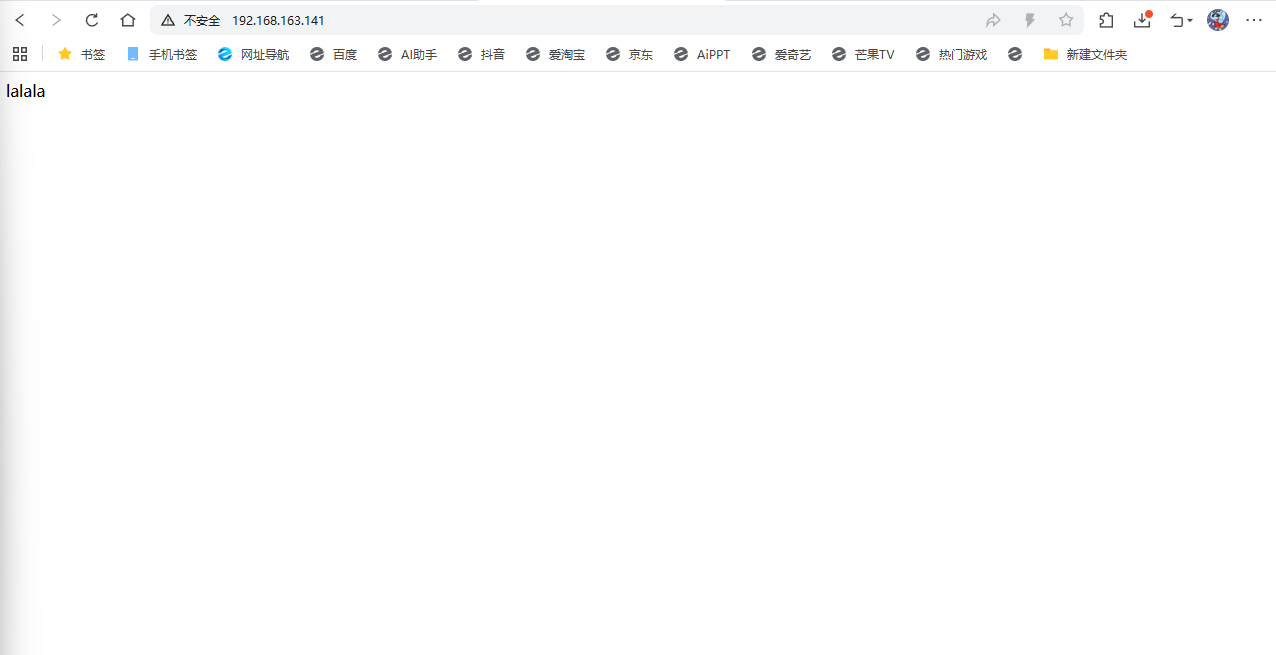
可以进行端口的查看
ss -ntlp
[root@localhost ~]# ss -ntlp
State          Recv-Q         Send-Q                 Local Address:Port                 Peer Address:Port        Process
LISTEN         0              4096                         0.0.0.0:111                       0.0.0.0:*            users:(("rpcbind",pid=986,fd=4),("systemd",pid=1,fd=35))
LISTEN         0              4096                         0.0.0.0:80                        0.0.0.0:*            users:(("docker-proxy",pid=6336,fd=8))
LISTEN         0              128                          0.0.0.0:22                        0.0.0.0:*            users:(("sshd",pid=1262,fd=7))
LISTEN         0              128                        127.0.0.1:6011                      0.0.0.0:*            users:(("sshd-session",pid=3408,fd=10))
LISTEN         0              128                        127.0.0.1:6010                      0.0.0.0:*            users:(("sshd-session",pid=3125,fd=10))
LISTEN         0              32                      192.168.77.1:53                        0.0.0.0:*            users:(("dnsmasq",pid=4078,fd=6))
LISTEN         0              32                      192.168.66.1:53                        0.0.0.0:*            users:(("dnsmasq",pid=4032,fd=6))
LISTEN         0              32                     192.168.123.1:53                        0.0.0.0:*            users:(("dnsmasq",pid=4120,fd=6))
LISTEN         0              4096                            [::]:111                          [::]:*            users:(("rpcbind",pid=986,fd=6),("systemd",pid=1,fd=37))
LISTEN         0              4096                            [::]:80                           [::]:*            users:(("docker-proxy",pid=6344,fd=8))
LISTEN         0              128                             [::]:22                           [::]:*            users:(("sshd",pid=1262,fd=8))
LISTEN         0              4096                               *:9090                            *:*            users:(("cockpit-tls",pid=3533,fd=3),("systemd",pid=1,fd=61))
LISTEN         0              128                            [::1]:6010                         [::]:*            users:(("sshd-session",pid=3125,fd=9))
LISTEN         0              128                            [::1]:6011                         [::]:*            users:(("sshd-session",pid=3408,fd=9))
这样基本原理已经跑通,就可以进行镜像的构建了
[root@localhost ~]# docker ps -a
CONTAINER ID IMAGE COMMAND CREATED STATUS PORTS NA
531d7fafe5d6 rockylinux:9.3 "/bin/bash" 4 hours ago Exited (0) 10 seconds ago coionate_dijkstra
d0f8abdca90b centos:7 "/bin/bash" 4 hours ago Exited (127) 4 hours ago grolden
015dfadf4797 centos:7 "ping -c 10 qq.com" 4 hours ago Exited (0) 4 hours ago re_black
进行镜像的构建
docker commit -a "lyq" -m "nginx server v1" 531d7fafe5d6 rocky_nginx:v1
docker images
[root@localhost ~]# docker images
i Info → U In Use
IMAGE ID DISK USAGE CONTENT SIZE EXTRA
centos:7 be65f488b776 299MB 76.1MB U
mynginx:latest ec4ed8b5299e 238MB 66MB
nginx:latest ec4ed8b5299e 238MB 66MB
rocky_nginx:v1 17273b31781c 478MB 144MB U
rockylinux:9.3 d7be1c094cc5 260MB 68.9MB U
[root@localhost ~]# mkdir web_game
cd web_game/
vim Dockerfile
FROM rockylinux:9.3
RUN yum -y install nginx && \
echo "daemon off;" >> /etc/nginx/nginx.conf && \
yum clean all && rm -rf /usr/share/nginx/html/*
ADD index.html /usr/share/nginx/html
EXPOSE 80
ENTRYPOINT ["/usr/sbin/nginx"]
:wq
vim index.html
: set paste
i
<!DOCTYPE html>
<html lang="zh-CN">
<head>
<meta charset="UTF-8">
<title>坦克大战</title>
<style>
* { margin: 0; padding: 0; box-sizing: border-box; }
body { background: #1a1a2e; display: flex; justify-content: center; align-items: center; min-height: 100vh; font-family: 'Microsoft YaHei', sans-serif; }
#gameWrapper { display: flex; gap: 20px; align-items: flex-start; }
canvas { border: 3px solid #e94560; background: #111; display: block; }
#sidebar {
background: #16213e; border: 2px solid #e94560; border-radius: 10px;
padding: 20px; color: #eee; width: 200px; text-align: center;
}
#sidebar h2 { color: #e94560; margin-bottom: 15px; font-size: 22px; }
.info-item { margin: 10px 0; font-size: 16px; }
.info-item span { color: #0f3460; background: #e94560; padding: 2px 10px; border-radius: 5px; font-weight: bold; color: #fff; }
#startBtn, #pauseBtn {
display: block; width: 100%; margin: 10px 0; padding: 10px;
background: #e94560; color: #fff; border: none; border-radius: 8px;
font-size: 16px; cursor: pointer; transition: 0.3s;
}
#startBtn:hover, #pauseBtn:hover { background: #c73e54; }
#controls { margin-top: 15px; font-size: 13px; color: #aaa; text-align: left; line-height: 1.8; }
#controls b { color: #e94560; }
#overlay {
position: absolute; top: 0; left: 0; width: 100%; height: 100%;
background: rgba(0,0,0,0.7); display: flex; justify-content: center;
align-items: center; flex-direction: column; color: #fff; z-index: 10;
}
#overlay h1 { font-size: 48px; color: #e94560; margin-bottom: 20px; }
#overlay p { font-size: 20px; margin: 5px; }
#overlay .start-hint { margin-top: 30px; font-size: 16px; color: #aaa; animation: blink 1.5s infinite; }
@keyframes blink { 50% { opacity: 0.3; } }
</style>
</head>
<body>
<div id="gameWrapper">
<canvas id="gameCanvas" width="780" height="585"></canvas>
<div id="sidebar">
<h2>🎮 坦克大战</h2>
<div class="info-item">关卡:<span id="levelDisplay">1</span></div>
<div class="info-item">分数:<span id="scoreDisplay">0</span></div>
<div class="info-item">生命:<span id="livesDisplay">3</span></div>
<div class="info-item">敌人:<span id="enemyDisplay">0</span></div>
<div class="info-item">最高分:<span id="highScoreDisplay">0</span></div>
<button id="startBtn" onclick="startGame()">开始游戏</button>
<button id="pauseBtn" onclick="togglePause()">暂停</button>
<div id="controls">
<b>操作说明:</b><br>
↑↓←→ 移动<br>
空格 发射子弹<br>
P 暂停/继续
</div>
</div>
</div>
<script>
const canvas = document.getElementById('gameCanvas');
const ctx = canvas.getContext('2d');
const W = canvas.width, H = canvas.height;
const TILE = 30;
const COLS = Math.floor(W / TILE), ROWS = Math.floor(H / TILE);
// 游戏状态
let game = { running: false, paused: false, level: 1, score: 0, lives: 3, highScore: 0, enemiesLeft: 0, enemySpawnTimer: 0 };
let player, enemies, bullets, explosions, powerups, walls, steels, water, base;
let keys = {};
let animFrame;
// 地图元素:0空 1砖墙 2钢墙 3水 4草地 5基地
const levels = [
// 第1关
[
[0,0,0,0,0,0,0,0,0,0,0,0,0,0,0,0,0,0,0,0,0,0,0,0,0,0],
[0,0,0,0,0,0,0,0,0,0,0,0,0,0,0,0,0,0,0,0,0,0,0,0,0,0],
[0,0,1,1,0,0,1,1,0,0,1,1,0,0,1,1,0,0,1,1,0,0,1,1,0,0],
[0,0,1,1,0,0,1,1,0,0,1,1,0,0,1,1,0,0,1,1,0,0,1,1,0,0],
[0,0,1,1,0,0,1,1,0,0,1,1,0,0,1,1,0,0,1,1,0,0,1,1,0,0],
[0,0,1,1,0,0,1,1,0,0,1,1,2,2,1,1,0,0,1,1,0,0,1,1,0,0],
[0,0,1,1,0,0,1,1,0,0,1,1,0,0,1,1,0,0,1,1,0,0,1,1,0,0],
[0,0,0,0,0,0,0,0,0,0,0,0,0,0,0,0,0,0,0,0,0,0,0,0,0,0],
[0,0,0,0,0,0,0,0,0,0,0,0,0,0,0,0,0,0,0,0,0,0,0,0,0,0],
[0,0,1,1,0,0,1,1,0,0,0,0,0,0,0,0,0,0,1,1,0,0,1,1,0,0],
[0,0,1,1,0,0,1,1,0,0,0,0,0,0,0,0,0,0,1,1,0,0,1,1,0,0],
[0,0,0,0,0,0,0,0,0,0,1,1,0,0,1,1,0,0,0,0,0,0,0,0,0,0],
[0,0,0,0,0,0,0,0,0,0,1,1,0,0,1,1,0,0,0,0,0,0,0,0,0,0],
[0,0,1,1,0,0,1,1,0,0,1,1,0,0,1,1,0,0,1,1,0,0,1,1,0,0],
[0,0,1,1,0,0,1,1,0,0,0,0,0,0,0,0,0,0,1,1,0,0,1,1,0,0],
[0,0,1,1,0,0,1,1,0,0,0,0,0,0,0,0,0,0,1,1,0,0,1,1,0,0],
[0,0,0,0,0,0,0,0,0,0,0,0,0,0,0,0,0,0,0,0,0,0,0,0,0,0],
[0,0,0,0,0,0,0,0,0,0,1,1,1,1,1,1,0,0,0,0,0,0,0,0,0,0],
[0,0,0,0,0,0,0,0,0,0,1,1,5,5,1,1,0,0,0,0,0,0,0,0,0,0],
],
// 第2关
[
[0,0,0,0,0,0,0,0,0,0,0,0,0,0,0,0,0,0,0,0,0,0,0,0,0,0],
[0,0,0,2,2,0,0,0,1,1,0,0,0,0,0,0,1,1,0,0,0,0,2,2,0,0],
[0,0,0,2,2,0,0,0,1,1,0,0,0,0,0,0,1,1,0,0,0,0,2,2,0,0],
[0,0,0,0,0,0,0,0,0,0,0,0,1,1,0,0,0,0,0,0,0,0,0,0,0,0],
[0,0,1,1,0,0,1,1,0,0,0,0,1,1,0,0,0,0,1,1,0,0,1,1,0,0],
[0,0,1,1,0,0,1,1,0,0,3,3,0,0,3,3,0,0,1,1,0,0,1,1,0,0],
[0,0,0,0,0,0,0,0,0,0,3,3,0,0,3,3,0,0,0,0,0,0,0,0,0,0],
[0,0,0,0,0,0,0,0,2,2,0,0,0,0,0,0,2,2,0,0,0,0,0,0,0,0],
[1,1,0,0,1,1,0,0,2,2,0,0,0,0,0,0,2,2,0,0,1,1,0,0,1,1],
[1,1,0,0,1,1,0,0,0,0,0,0,1,1,0,0,0,0,0,0,1,1,0,0,1,1],
[0,0,0,0,0,0,0,0,0,0,0,0,1,1,0,0,0,0,0,0,0,0,0,0,0,0],
[0,0,1,1,0,0,0,0,0,0,0,0,0,0,0,0,0,0,0,0,1,1,0,0,0,0],
[0,0,1,1,0,0,2,2,0,0,1,1,0,0,1,1,0,0,2,2,1,1,0,0,0,0],
[0,0,0,0,0,0,2,2,0,0,1,1,0,0,1,1,0,0,2,2,0,0,0,0,0,0],
[0,0,0,0,0,0,0,0,0,0,0,0,0,0,0,0,0,0,0,0,0,0,0,0,0,0],
[0,0,1,1,0,0,0,0,0,0,0,0,0,0,0,0,0,0,0,0,1,1,0,0,0,0],
[0,0,0,0,0,0,0,0,0,0,0,0,0,0,0,0,0,0,0,0,0,0,0,0,0,0],
[0,0,0,0,0,0,0,0,0,0,1,1,1,1,1,1,0,0,0,0,0,0,0,0,0,0],
[0,0,0,0,0,0,0,0,0,0,1,1,5,5,1,1,0,0,0,0,0,0,0,0,0,0],
],
// 第3关
[
[0,0,0,0,0,0,0,0,0,0,0,0,0,0,0,0,0,0,0,0,0,0,0,0,0,0],
[0,2,2,0,0,1,1,0,0,0,0,0,2,2,0,0,0,0,1,1,0,0,2,2,0,0],
[0,2,2,0,0,1,1,0,0,0,0,0,2,2,0,0,0,0,1,1,0,0,2,2,0,0],
[0,0,0,0,0,0,0,0,1,1,0,0,0,0,0,0,1,1,0,0,0,0,0,0,0,0],
[0,0,1,1,3,3,0,0,1,1,0,0,0,0,0,0,1,1,0,0,3,3,1,1,0,0],
[0,0,1,1,3,3,0,0,0,0,0,0,1,1,0,0,0,0,0,0,3,3,1,1,0,0],
[0,0,0,0,0,0,0,0,0,0,2,2,0,0,2,2,0,0,0,0,0,0,0,0,0,0],
[0,0,0,0,0,0,0,0,0,0,2,2,0,0,2,2,0,0,0,0,0,0,0,0,0,0],
[2,2,0,0,0,0,1,1,0,0,0,0,0,0,0,0,0,0,1,1,0,0,0,0,2,2],
[2,2,0,0,0,0,1,1,0,0,0,0,0,0,0,0,0,0,1,1,0,0,0,0,2,2],
[0,0,0,0,0,0,0,0,0,0,2,2,0,0,2,2,0,0,0,0,0,0,0,0,0,0],
[0,0,1,1,0,0,0,0,0,0,2,2,0,0,2,2,0,0,0,0,0,0,1,1,0,0],
[0,0,1,1,0,0,3,3,0,0,0,0,1,1,0,0,0,0,3,3,0,0,1,1,0,0],
[0,0,0,0,0,0,3,3,0,0,0,0,1,1,0,0,0,0,3,3,0,0,0,0,0,0],
[0,0,0,0,0,0,0,0,0,0,0,0,0,0,0,0,0,0,0,0,0,0,0,0,0,0],
[0,0,2,2,0,0,0,0,0,0,0,0,0,0,0,0,0,0,0,0,0,0,2,2,0,0],
[0,0,2,2,0,0,0,0,0,0,0,0,0,0,0,0,0,0,0,0,0,0,2,2,0,0],
[0,0,0,0,0,0,0,0,0,0,1,1,1,1,1,1,0,0,0,0,0,0,0,0,0,0],
[0,0,0,0,0,0,0,0,0,0,1,1,5,5,1,1,0,0,0,0,0,0,0,0,0,0],
]
];
// 初始化地图
function loadLevel(lvl) {
walls = []; steels = []; water = [];
const map = levels[(lvl - 1) % levels.length];
for (let r = 0; r < map.length; r++) {
for (let c = 0; c < map[r].length; c++) {
const t = map[r][c];
if (t === 1) walls.push({ x: c * TILE, y: r * TILE, hp: 2 });
else if (t === 2) steels.push({ x: c * TILE, y: r * TILE });
else if (t === 3) water.push({ x: c * TILE, y: r * TILE });
else if (t === 4) {} // 草地(预留)
else if (t === 5) base = { x: c * TILE, y: r * TILE, alive: true };
}
}
}
// 坦克工厂
function createTank(x, y, dir, color, isPlayer, speed, bulletSpeed, shootCooldown, hp) {
return {
x, y, dir, color, isPlayer, speed, bulletSpeed, shootCooldown,
shootTimer: 0, hp: hp || 1, size: TILE - 4, alive: true,
shieldTimer: 0, speedBoostTimer: 0
};
}
// 子弹
function createBullet(tank) {
const bx = tank.x + tank.size / 2 - 3;
const by = tank.y + tank.size / 2 - 3;
const spd = tank.bulletSpeed;
const dx = [0, 0, -1, 1][tank.dir];
const dy = [-1, 1, 0, 0][tank.dir];
return { x: bx, y: by, dx: dx * spd, dy: dy * spd, owner: tank.isPlayer ? 'player' : 'enemy', size: 6, alive: true };
}
// 爆炸效果
function createExplosion(x, y, big) {
return { x, y, timer: big ? 20 : 12, maxTimer: big ? 20 : 12, big, alive: true };
}
// 道具
function createPowerup() {
const types = ['life', 'shield', 'speed', 'bomb'];
const type = types[Math.floor(Math.random() * types.length)];
let x, y, tries = 0;
do {
x = Math.floor(Math.random() * (COLS - 2)) * TILE;
y = Math.floor(Math.random() * (ROWS - 4)) * TILE;
tries++;
} while (isBlocked(x, y) && tries < 50);
return { x, y, type, timer: 600, alive: true };
}
// 碰撞检测
function rectCollide(a, ax, ay, as, b, bx, by, bs) {
return ax < bx + bs && ax + as > bx && ay < by + bs && ay + as > by;
}
function isBlocked(x, y, ignoreTank) {
for (const w of walls) if (rectCollide(null, x, y, TILE - 4, null, w.x, w.y, TILE)) return true;
for (const s of steels) if (rectCollide(null, x, y, TILE - 4, null, s.x, s.y, TILE)) return true;
for (const wt of water) if (rectCollide(null, x, y, TILE - 4, null, wt.x, wt.y, TILE)) return true;
if (base && base.alive && rectCollide(null, x, y, TILE - 4, null, base.x, base.y, TILE * 2)) return true;
if (!ignoreTank) {
if (player && player.alive && rectCollide(null, x, y, TILE - 4, null, player.x, player.y, player.size)) return true;
for (const e of enemies) if (e.alive && rectCollide(null, x, y, TILE - 4, null, e.x, e.y, e.size)) return true;
}
return false;
}
function canMove(tank, nx, ny) {
if (nx < 0 || ny < 0 || nx + tank.size > W || ny + tank.size > H) return false;
for (const w of walls) if (rectCollide(null, nx, ny, tank.size, null, w.x, w.y, TILE)) return false;
for (const s of steels) if (rectCollide(null, nx, ny, tank.size, null, s.x, s.y, TILE)) return false;
for (const wt of water) if (rectCollide(null, nx, ny, tank.size, null, wt.x, wt.y, TILE)) return false;
if (base && base.alive && rectCollide(null, nx, ny, tank.size, null, base.x, base.y, TILE * 2)) return false;
// 坦克之间碰撞
if (tank.isPlayer) {
for (const e of enemies) if (e.alive && e !== tank && rectCollide(null, nx, ny, tank.size, null, e.x, e.y, e.size)) return false;
} else {
if (player && player.alive && rectCollide(null, nx, ny, tank.size, null, player.x, player.y, player.size)) return false;
for (const e of enemies) if (e.alive && e !== tank && rectCollide(null, nx, ny, tank.size, null, e.x, e.y, e.size)) return false;
}
return true;
}
// 敌人AI
function updateEnemyAI(e) {
if (!e.alive) return;
e.shootTimer--;
// 随机移动方向
if (Math.random() < 0.02) {
e.dir = Math.floor(Math.random() * 4);
}
// 有概率朝玩家方向转向
if (player && player.alive && Math.random() < 0.05) {
const dx = player.x - e.x, dy = player.y - e.y;
if (Math.abs(dx) > Math.abs(dy)) e.dir = dx > 0 ? 3 : 2;
else e.dir = dy > 0 ? 1 : 0;
}
const spd = e.speed;
let nx = e.x + [0, 0, -spd, spd][e.dir];
let ny = e.y + [-spd, spd, 0, 0][e.dir];
if (canMove(e, nx, ny)) {
e.x = nx; e.y = ny;
} else {
e.dir = Math.floor(Math.random() * 4);
}
// 射击 - 高攻击频率
if (e.shootTimer <= 0 && Math.random() < 0.06) {
bullets.push(createBullet(e));
e.shootTimer = e.shootCooldown;
}
}
// 玩家控制
function updatePlayer() {
if (!player || !player.alive) return;
player.shootTimer--;
if (player.shieldTimer > 0) player.shieldTimer--;
if (player.speedBoostTimer > 0) player.speedBoostTimer--;
const spd = player.speedBoostTimer > 0 ? player.speed * 1.5 : player.speed;
let moved = false;
if (keys['ArrowUp'] || keys['w'] || keys['W']) { player.dir = 0; moved = true; }
else if (keys['ArrowDown'] || keys['s'] || keys['S']) { player.dir = 1; moved = true; }
else if (keys['ArrowLeft'] || keys['a'] || keys['A']) { player.dir = 2; moved = true; }
else if (keys['ArrowRight'] || keys['d'] || keys['D']) { player.dir = 3; moved = true; }
if (moved) {
let nx = player.x + [0, 0, -spd, spd][player.dir];
let ny = player.y + [-spd, spd, 0, 0][player.dir];
if (canMove(player, nx, ny)) { player.x = nx; player.y = ny; }
}
if (keys[' '] && player.shootTimer <= 0) {
bullets.push(createBullet(player));
player.shootTimer = player.shootCooldown;
}
}
// 更新子弹
function updateBullets() {
for (const b of bullets) {
if (!b.alive) continue;
b.x += b.dx; b.y += b.dy;
// 出界
if (b.x < 0 || b.y < 0 || b.x > W || b.y > H) { b.alive = false; continue; }
// 命中砖墙
for (let i = walls.length - 1; i >= 0; i--) {
const w = walls[i];
if (rectCollide(null, b.x, b.y, b.size, null, w.x, w.y, TILE)) {
b.alive = false;
w.hp--;
if (w.hp <= 0) walls.splice(i, 1);
explosions.push(createExplosion(w.x + TILE / 2, w.y + TILE / 2, false));
break;
}
}
if (!b.alive) continue;
// 命中钢墙
for (const s of steels) {
if (rectCollide(null, b.x, b.y, b.size, null, s.x, s.y, TILE)) {
b.alive = false;
explosions.push(createExplosion(b.x, b.y, false));
break;
}
}
if (!b.alive) continue;
// 命中基地
if (base && base.alive && rectCollide(null, b.x, b.y, b.size, null, base.x, base.y, TILE * 2)) {
b.alive = false;
base.alive = false;
explosions.push(createExplosion(base.x + TILE, base.y + TILE, true));
gameOver(false);
continue;
}
// 玩家子弹命中敌人
if (b.owner === 'player') {
for (const e of enemies) {
if (e.alive && rectCollide(null, b.x, b.y, b.size, null, e.x, e.y, e.size)) {
b.alive = false;
e.hp--;
if (e.hp <= 0) {
e.alive = false;
game.score += 100;
game.enemiesLeft--;
explosions.push(createExplosion(e.x + e.size / 2, e.y + e.size / 2, true));
// 随机掉落道具
if (Math.random() < 0.3) powerups.push(createPowerup());
updateUI();
checkLevelClear();
} else {
explosions.push(createExplosion(b.x, b.y, false));
}
break;
}
}
}
// 敌人子弹命中玩家
else if (b.owner === 'enemy' && player && player.alive) {
if (rectCollide(null, b.x, b.y, b.size, null, player.x, player.y, player.size)) {
b.alive = false;
if (player.shieldTimer > 0) {
explosions.push(createExplosion(b.x, b.y, false));
} else {
player.alive = false;
explosions.push(createExplosion(player.x + player.size / 2, player.y + player.size / 2, true));
game.lives--;
updateUI();
if (game.lives <= 0) {
gameOver(false);
} else {
setTimeout(respawnPlayer, 1500);
}
}
}
}
}
bullets = bullets.filter(b => b.alive);
}
// 更新道具
function updatePowerups() {
for (const p of powerups) {
if (!p.alive) continue;
p.timer--;
if (p.timer <= 0) { p.alive = false; continue; }
if (player && player.alive && rectCollide(null, p.x, p.y, TILE, null, player.x, player.y, player.size)) {
p.alive = false;
switch (p.type) {
case 'life': game.lives++; break;
case 'shield': player.shieldTimer = 300; break;
case 'speed': player.speedBoostTimer = 300; break;
case 'bomb':
for (const e of enemies) {
if (e.alive) {
e.alive = false;
game.score += 100;
game.enemiesLeft--;
explosions.push(createExplosion(e.x + e.size / 2, e.y + e.size / 2, true));
}
}
checkLevelClear();
break;
}
updateUI();
}
}
powerups = powerups.filter(p => p.alive);
}
// 更新爆炸
function updateExplosions() {
for (const ex of explosions) {
ex.timer--;
if (ex.timer <= 0) ex.alive = false;
}
explosions = explosions.filter(ex => ex.alive);
}
// 重生玩家
function respawnPlayer() {
player = createTank(TILE * 8, TILE * (ROWS - 2), 0, '#00ff88', true, 3, 6, 15, 1);
player.shieldTimer = 120;
}
// 敌人生成
function spawnEnemy() {
if (enemies.length >= 4 + game.level) return;
const spawns = [{ x: 0, y: 0 }, { x: TILE * 12, y: 0 }, { x: TILE * (COLS - 2), y: 0 }];
const sp = spawns[Math.floor(Math.random() * spawns.length)];
if (isBlocked(sp.x, sp.y, true)) return;
const hp = 1 + Math.floor(game.level / 3);
const e = createTank(sp.x, sp.y, 1, '#ff4444', false, 1.5 + game.level * 0.2, 4 + game.level * 0.3, 30 - game.level * 2, hp);
e.shootCooldown = Math.max(15, 30 - game.level * 2);
enemies.push(e);
}
// 检查关卡是否通关
function checkLevelClear() {
if (game.enemiesLeft <= 0 && enemies.filter(e => e.alive).length === 0) {
game.level++;
game.score += 500;
if (game.level > 10) {
gameOver(true);
} else {
initLevel();
}
}
}
// 游戏结束
function gameOver(win) {
game.running = false;
if (game.score > game.highScore) game.highScore = game.score;
updateUI();
ctx.fillStyle = 'rgba(0,0,0,0.8)';
ctx.fillRect(0, 0, W, H);
ctx.fillStyle = win ? '#00ff88' : '#e94560';
ctx.font = 'bold 48px Microsoft YaHei';
ctx.textAlign = 'center';
ctx.fillText(win ? '🎉 恭喜通关!' : '💀 游戏结束', W / 2, H / 2 - 30);
ctx.fillStyle = '#fff';
ctx.font = '24px Microsoft YaHei';
ctx.fillText(`最终得分:${game.score}`, W / 2, H / 2 + 20);
ctx.font = '18px Microsoft YaHei';
ctx.fillStyle = '#aaa';
ctx.fillText('点击"开始游戏"重新开始', W / 2, H / 2 + 60);
}
// 初始化关卡
function initLevel() {
loadLevel(game.level);
enemies = [];
bullets = [];
explosions = [];
powerups = [];
game.enemiesLeft = 6 + game.level * 2;
game.enemySpawnTimer = 0;
if (!player || !player.alive) {
player = createTank(TILE * 8, TILE * (ROWS - 2), 0, '#00ff88', true, 3, 6, 15, 1);
player.shieldTimer = 120;
}
updateUI();
}
// 开始游戏
function startGame() {
game.running = true;
game.paused = false;
game.level = 1;
game.score = 0;
game.lives = 3;
player = null;
initLevel();
if (!animFrame) gameLoop();
}
// 暂停
function togglePause() {
if (!game.running) return;
game.paused = !game.paused;
document.getElementById('pauseBtn').textContent = game.paused ? '继续' : '暂停';
}
// 更新UI
function updateUI() {
document.getElementById('levelDisplay').textContent = game.level;
document.getElementById('scoreDisplay').textContent = game.score;
document.getElementById('livesDisplay').textContent = game.lives;
document.getElementById('enemyDisplay').textContent = game.enemiesLeft;
document.getElementById('highScoreDisplay').textContent = game.highScore;
}
// ====== 渲染 ======
function drawTank(t) {
if (!t.alive) return;
ctx.save();
const cx = t.x + t.size / 2, cy = t.y + t.size / 2;
ctx.translate(cx, cy);
ctx.rotate(t.dir * Math.PI / 2);
// 车身
ctx.fillStyle = t.color;
ctx.fillRect(-t.size / 2, -t.size / 2, t.size, t.size);
// 履带
ctx.fillStyle = 'rgba(0,0,0,0.3)';
ctx.fillRect(-t.size / 2, -t.size / 2, 5, t.size);
ctx.fillRect(t.size / 2 - 5, -t.size / 2, 5, t.size);
// 炮管
ctx.fillStyle = t.isPlayer ? '#00ffaa' : '#ff6666';
ctx.fillRect(-3, -t.size / 2 - 6, 6, t.size / 2 + 6);
// 炮塔
ctx.fillStyle = t.isPlayer ? '#00cc66' : '#cc3333';
ctx.beginPath();
ctx.arc(0, 0, 8, 0, Math.PI * 2);
ctx.fill();
ctx.restore();
// 护盾效果
if (t.shieldTimer > 0) {
ctx.strokeStyle = `rgba(0, 200, 255, ${0.5 + Math.sin(Date.now() / 100) * 0.3})`;
ctx.lineWidth = 2;
ctx.beginPath();
ctx.arc(cx, cy, t.size / 2 + 4, 0, Math.PI * 2);
ctx.stroke();
}
// 血量显示(敌人多血时)
if (!t.isPlayer && t.hp > 1) {
ctx.fillStyle = '#ff0';
ctx.font = '10px Arial';
ctx.textAlign = 'center';
ctx.fillText('HP:' + t.hp, cx, t.y - 3);
}
}
function drawBullet(b) {
if (!b.alive) return;
ctx.fillStyle = b.owner === 'player' ? '#ffff00' : '#ff4444';
ctx.shadowColor = b.owner === 'player' ? '#ffff00' : '#ff4444';
ctx.shadowBlur = 6;
ctx.fillRect(b.x, b.y, b.size, b.size);
ctx.shadowBlur = 0;
}
function drawExplosion(ex) {
const progress = 1 - ex.timer / ex.maxTimer;
const radius = (ex.big ? 25 : 12) * (0.5 + progress);
const alpha = 1 - progress;
ctx.beginPath();
ctx.arc(ex.x, ex.y, radius, 0, Math.PI * 2);
ctx.fillStyle = `rgba(255, ${Math.floor(200 - progress * 200)}, 0, ${alpha})`;
ctx.fill();
ctx.beginPath();
ctx.arc(ex.x, ex.y, radius * 0.6, 0, Math.PI * 2);
ctx.fillStyle = `rgba(255, 255, 200, ${alpha * 0.8})`;
ctx.fill();
}
function drawMap() {
// 砖墙
for (const w of walls) {
ctx.fillStyle = w.hp > 1 ? '#b85c38' : '#a0522d';
ctx.fillRect(w.x, w.y, TILE, TILE);
ctx.strokeStyle = '#8b4513';
ctx.lineWidth = 1;
ctx.strokeRect(w.x, w.y, TILE, TILE);
// 砖纹
ctx.strokeStyle = 'rgba(0,0,0,0.2)';
ctx.beginPath();
ctx.moveTo(w.x + TILE / 2, w.y);
ctx.lineTo(w.x + TILE / 2, w.y + TILE);
ctx.moveTo(w.x, w.y + TILE / 2);
ctx.lineTo(w.x + TILE, w.y + TILE / 2);
ctx.stroke();
}
// 钢墙
for (const s of steels) {
ctx.fillStyle = '#888';
ctx.fillRect(s.x, s.y, TILE, TILE);
ctx.fillStyle = '#aaa';
ctx.fillRect(s.x + 2, s.y + 2, TILE - 4, TILE - 4);
ctx.fillStyle = '#666';
ctx.fillRect(s.x + 4, s.y + 4, TILE - 8, TILE - 8);
}
// 水
for (const wt of water) {
ctx.fillStyle = '#1a5276';
ctx.fillRect(wt.x, wt.y, TILE, TILE);
ctx.fillStyle = '#2980b9';
const wave = Math.sin(Date.now() / 300 + wt.x) * 3;
ctx.fillRect(wt.x, wt.y + 10 + wave, TILE, 4);
ctx.fillRect(wt.x, wt.y + 20 - wave, TILE, 4);
}
// 基地
if (base && base.alive) {
ctx.fillStyle = '#ffd700';
ctx.fillRect(base.x, base.y, TILE * 2, TILE * 2);
ctx.fillStyle = '#ff4500';
ctx.font = '20px Arial';
ctx.textAlign = 'center';
ctx.fillText('⭐', base.x + TILE, base.y + TILE + 7);
} else if (base && !base.alive) {
ctx.fillStyle = '#333';
ctx.fillRect(base.x, base.y, TILE * 2, TILE * 2);
ctx.fillStyle = '#666';
ctx.font = '16px Arial';
ctx.textAlign = 'center';
ctx.fillText('✕', base.x + TILE, base.y + TILE + 5);
}
}
function drawPowerups() {
for (const p of powerups) {
if (!p.alive) continue;
const flash = p.timer < 120 && Math.floor(p.timer / 10) % 2 === 0;
if (flash) continue;
ctx.fillStyle = 'rgba(0,0,0,0.5)';
ctx.fillRect(p.x, p.y, TILE, TILE);
const colors = { life: '#ff4444', shield: '#4488ff', speed: '#44ff44', bomb: '#ffaa00' };
const icons = { life: '❤', shield: '🛡', speed: '⚡', bomb: '💣' };
ctx.fillStyle = colors[p.type];
ctx.font = '18px Arial';
ctx.textAlign = 'center';
ctx.fillText(icons[p.type], p.x + TILE / 2, p.y + TILE / 2 + 6);
}
}
function drawGrid() {
ctx.strokeStyle = 'rgba(255,255,255,0.03)';
ctx.lineWidth = 0.5;
for (let x = 0; x < W; x += TILE) {
ctx.beginPath(); ctx.moveTo(x, 0); ctx.lineTo(x, H); ctx.stroke();
}
for (let y = 0; y < H; y += TILE) {
ctx.beginPath(); ctx.moveTo(0, y); ctx.lineTo(W, y); ctx.stroke();
}
}
// 主循环
function gameLoop() {
animFrame = requestAnimationFrame(gameLoop);
if (!game.running || game.paused) {
if (game.paused && game.running) {
ctx.fillStyle = 'rgba(0,0,0,0.5)';
ctx.fillRect(0, 0, W, H);
ctx.fillStyle = '#fff';
ctx.font = '36px Microsoft YaHei';
ctx.textAlign = 'center';
ctx.fillText('⏸ 已暂停', W / 2, H / 2);
}
return;
}
// 生成敌人
game.enemySpawnTimer++;
if (game.enemySpawnTimer >= 90 && enemies.filter(e => e.alive).length < 3 + game.level) {
spawnEnemy();
game.enemySpawnTimer = 0;
}
// 更新
updatePlayer();
for (const e of enemies) updateEnemyAI(e);
updateBullets();
updatePowerups();
updateExplosions();
// 渲染
ctx.clearRect(0, 0, W, H);
drawGrid();
drawMap();
drawPowerups();
for (const e of enemies) drawTank(e);
if (player) drawTank(player);
for (const b of bullets) drawBullet(b);
for (const ex of explosions) drawExplosion(ex);
// 顶部信息条
ctx.fillStyle = 'rgba(0,0,0,0.7)';
ctx.fillRect(0, 0, W, 24);
ctx.fillStyle = '#fff';
ctx.font = '13px Microsoft YaHei';
ctx.textAlign = 'left';
ctx.fillText(`关卡 ${game.level} | 分数 ${game.score} | 生命 ${game.lives} | 剩余敌人 ${game.enemiesLeft}`, 10, 16);
}
// 键盘事件
document.addEventListener('keydown', e => {
keys[e.key] = true;
if (e.key === 'p' || e.key === 'P') togglePause();
if (['ArrowUp', 'ArrowDown', 'ArrowLeft', 'ArrowRight', ' '].includes(e.key)) e.preventDefault();
});
document.addEventListener('keyup', e => { keys[e.key] = false; });
// 初始画面
ctx.fillStyle = '#111';
ctx.fillRect(0, 0, W, H);
ctx.fillStyle = '#e94560';
ctx.font = 'bold 42px Microsoft YaHei';
ctx.textAlign = 'center';
ctx.fillText('🎮 坦克大战', W / 2, H / 2 - 40);
ctx.fillStyle = '#aaa';
ctx.font = '18px Microsoft YaHei';
ctx.fillText('点击右侧「开始游戏」按钮开始', W / 2, H / 2 + 10);
ctx.fillStyle = '#666';
ctx.font = '14px Microsoft YaHei';
ctx.fillText('方向键/WASD移动 | 空格射击 | P暂停', W / 2, H / 2 + 40);
</script>
</body>
</html>
:wq
docker run -d -P web_game:V2
[root@localhost web_game]# docker run -d -P web_game:v2 //-P是系统随机分配端口
e4e4e553d32330a9a7a30f997f6a0fcab5dfd505dfe416e216f9f74b34ef9803
[root@localhost web_game]# docker ps -a
CONTAINER ID IMAGE COMMAND CREATED STATUS PORTS NAMES
e4e4e553d323 web_game:v2 "/usr/sbin/nginx" 11 seconds ago Up 11 seconds 0.0.0.0:32769->80/tcp, [::]:32769->80/tcp competent_ishizaka
2fac52993c26 web_game:v1 "/usr/sbin/nginx" 10 minutes ago Up 10 minutes 0.0.0.0:32768->80/tcp, [::]:32768->80/tcp infallible_agnesi
27bad0ca9b3c rocky_nginx:v1 "/usr/sbin/nginx" 48 minutes ago Up 48 minutes 0.0.0.0:80->80/tcp, [::]:80->80/tcp my_nginx
531d7fafe5d6 rockylinux:9.3 "/bin/bash" 5 hours ago Exited (0) About an hour ago compassionate_dijkstra
d0f8abdca90b centos:7 "/bin/bash" 5 hours ago Exited (127) 5 hours ago great_colden
015dfadf4797 centos:7 "ping -c 10 qq.com" 5 hours ago Exited (0) 5 hours ago relaxed_black
[root@localhost web_game]# ss -ntlp
State Recv-Q Send-Q Local Address:Port Peer Address:Port Process
LISTEN 0 4096 0.0.0.0:111 0.0.0.0:* users:(("rpcbind",pid=986,fd=4),("systemd",pid=1,fd=35))
LISTEN 0 4096 0.0.0.0:80 0.0.0.0:* users:(("docker-proxy",pid=6336,fd=8))
LISTEN 0 128 0.0.0.0:22 0.0.0.0:* users:(("sshd",pid=1262,fd=7))
LISTEN 0 4096 0.0.0.0:32768 0.0.0.0:* users:(("docker-proxy",pid=7102,fd=8))
LISTEN 0 4096 0.0.0.0:32769 0.0.0.0:* users:(("docker-proxy",pid=7769,fd=8))
LISTEN 0 128 127.0.0.1:6011 0.0.0.0:* users:(("sshd-session",pid=3408,fd=10))
LISTEN 0 128 127.0.0.1:6010 0.0.0.0:* users:(("sshd-session",pid=3125,fd=10))
LISTEN 0 32 192.168.77.1:53 0.0.0.0:* users:(("dnsmasq",pid=4078,fd=6))
LISTEN 0 32 192.168.66.1:53 0.0.0.0:* users:(("dnsmasq",pid=4032,fd=6))
LISTEN 0 32 192.168.123.1:53 0.0.0.0:* users:(("dnsmasq",pid=4120,fd=6))
LISTEN 0 4096 [::]:111 [::]:* users:(("rpcbind",pid=986,fd=6),("systemd",pid=1,fd=37))
LISTEN 0 4096 [::]:80 [::]:* users:(("docker-proxy",pid=6344,fd=8))
LISTEN 0 128 [::]:22 [::]:* users:(("sshd",pid=1262,fd=8))
LISTEN 0 4096 [::]:32768 [::]:* users:(("docker-proxy",pid=7108,fd=8))
LISTEN 0 4096 [::]:32769 [::]:* users:(("docker-proxy",pid=7775,fd=8))
LISTEN 0 4096 *:9090 *:* users:(("cockpit-tls",pid=3533,fd=3),("systemd",pid=1,fd=61))
LISTEN 0 128 [::1]:6010 [::]:* users:(("sshd-session",pid=3125,fd=9))
LISTEN 0 128 [::1]:6011 [::]:* users:(("sshd-session",pid=3408,fd=9))
docker的数据管理
UnionFS(联合文件系统)
Docker 中的 UnionFS(联合文件系统)是一种分层、轻量级且高性能的文件系统,其核心功能是将多个目录内容联合挂载到同一个目录下,形成一个统一的文件系统视图。以下是其主要特点和作用:
核心特点
分层存储:UnionFS 可以将不同层次的文件和目录合并成单一的目录树。在 Docker 中,每一层可以代表一个镜像层,最低层通常是只读的基础镜像层,上面的层是可写的容器层。
写时复制(Copy-on-Write, CoW):当容器需要修改一个文件时,UnionFS 不会直接更改底层只读镜像中的文件,而是将更改写入到一个可写的上层。这样,原始镜像层保持不变,可以被多个容器共享。
隔离性:由于底层的只读镜像层保持不变,每个容器看到的是一个完整的文件系统视图,包括它们的改动,但这些改动仅存在于它们自己的可写层中。
性能优化:UnionFS 通过仅对发生更改的文件进行操作,以及通过页面缓存共享等机制,减少了磁盘 I/O 操作,加快了容器启动时间。
在 Docker 中的应用
镜像分层:Docker 镜像是由多个只读层叠加而成的,每一层都代表了镜像构建过程中的一个状态。UnionFS 将这些层联合起来,形成一个完整的文件系统。
容器运行时的文件系统:当启动一个容器时,Docker 会在镜像的最顶层添加一个新的可写层。容器的所有写操作都在这个可写层中进行,而不会影响到镜像的只读层。
镜像继承与共享:由于镜像的分层结构,新的镜像可以基于已有的镜像构建,只需添加新的层即可。同时,多个容器可以共享同一个镜像的只读层,极大地节省了磁盘空间。
常见的 UnionFS 实现
虽然 UnionFS 是一个理念,但 Linux 内核中有多种具体的实现方式,Docker 默认使用的是 Overlay2。Overlay2 是一种先进的联合文件系统实现,具有更好的性能和一些先进的功能,如页面缓存共享。
镜像层与可写层
在 Docker 中,镜像层和容器可写层是基于联合文件系统(UnionFS)实现的关键概念。它们共同构成了容器的文件系统结构,使得 Docker 能够高效地管理和运行容器。以下是对镜像层和容器可写层的详细解释:
一、镜像层
镜像层是 Docker 镜像的组成部分,每个镜像由多个只读层组成,这些层是不可修改的。
镜像层的生成
当你构建一个 Docker 镜像时,Dockerfile 中的每一条指令(如 RUN、COPY、ADD 等)都会生成一个新的镜像层。
例如,一个简单的 Dockerfile 如下:
FROM ubuntu:20.04
RUN apt-get update && apt-get install -y nginx
COPY ./my_nginx.conf /etc/nginx/nginx.conf
第一层是基础镜像层,如 ubuntu:20.04,这是从 Docker Hub 拉取的预构建镜像。
第二层是通过 RUN 指令安装 Nginx 生成的层,包含了安装过程中产生的所有文件和目录变化。
第三层是通过 COPY 指令将本地的 my_nginx.conf 文件复制到镜像中的 /etc/nginx/nginx.conf 位置生成的层。
每一层都是基于前一层构建的,新的层只包含与前一层的差异部分。
镜像层的特点
只读性:镜像层是只读的,一旦创建就不能修改。如果需要修改镜像层中的内容,必须通过构建新的镜像层来实现。
共享性:多个容器可以共享同一个镜像层,因为镜像层是不可变的,这大大节省了磁盘空间。
不可变性:镜像层的不可变性保证了镜像的一致性和可重复性,无论在什么环境下运行,基于同一镜像启动的容器都具有相同的文件系统结构。
镜像层的作用
构建高效:通过分层构建,Docker 可以缓存中间层,避免重复构建相同的操作。例如,如果基础镜像层和安装 Nginx 的层已经构建过,再次构建时可以直接使用缓存的层,而不是重新执行命令。
节省空间:多个容器可以共享镜像层,减少了磁盘空间的占用。例如,10 个基于同一个基础镜像的容器,只需要存储一份基础镜像层,而不是每份都单独存储。
便于分发:镜像层的结构使得镜像可以方便地分发和共享。用户可以从 Docker Hub 等镜像仓库拉取镜像,而无需关心镜像的具体构建过程。
二、容器可写层
容器可写层是容器运行时特有的一个层,它是可写的,用于存储容器运行时产生的所有变更。
容器可写层的生成
当你启动一个容器时,Docker 会在镜像的最顶层添加一个新的可写层。这个可写层是容器独有的,用于存储容器运行时的文件系统变更。
例如,如果你在容器中创建了一个新文件、修改了一个现有文件或删除了一个文件,这些操作都会反映在容器可写层中,而不会影响到镜像层。
容器可写层的特点
可写性:容器可写层是可写的,容器运行时的所有文件系统操作(如创建、修改、删除文件)都在这个层中进行。
独立性:每个容器都有自己的可写层,容器之间的可写层是隔离的。一个容器的变更不会影响到其他容器。
临时性:容器可写层的内容在容器被删除时也会被删除。如果需要持久化数据,需要将数据存储在外部存储(如卷)中。
容器可写层的作用
隔离性:容器可写层保证了容器之间的隔离性。每个容器在自己的可写层中进行操作,不会影响到其他容器或镜像层。
灵活性:容器可写层允许容器在运行时动态地修改文件系统,而不会影响到镜像的原始状态。这使得容器可以灵活地运行各种应用程序。
数据持久化:虽然容器可写层的内容在容器删除时会被删除,但你可以通过挂载卷(Volumes)将数据持久化到宿主机或其他存储设备中,从而实现数据的持久化存储。
三、镜像层与容器可写层的关系
镜像层和容器可写层通过联合文件系统(UnionFS)联合起来,形成了容器的完整文件系统视图。
联合挂载
Docker 使用联合文件系统将镜像层和容器可写层联合挂载到同一个目录下。从容器的角度来看,它看到的是一个完整的文件系统,包含了镜像层和容器可写层的内容。
例如,当你在容器中访问一个文件时,Docker 会先在容器可写层中查找该文件。如果找不到,就会在镜像层中查找。如果在镜像层中找到了文件,就会将该文件的内容返回给容器。
写时复制(Copy-on-Write)
当容器需要修改一个文件时,Docker 会使用写时复制机制。具体来说,Docker 会将文件从镜像层复制到容器可写层,然后在可写层中进行修改。这样,镜像层保持不变,而容器可写层存储了修改后的文件。
例如,假设镜像层中有一个文件 /etc/nginx/nginx.conf,容器需要修改这个文件。Docker 会将该文件从镜像层复制到容器可写层,然后在可写层中进行修改。从容器的角度来看,它看到的是修改后的文件,而镜像层中的文件保持不变。
删除操作
当容器删除一个文件时,Docker 会在容器可写层中记录一个删除操作,而不是真正删除镜像层中的文件。这样,镜像层保持不变,而容器可写层记录了文件的删除状态。
例如,假设容器删除了一个文件 /etc/nginx/nginx.conf,Docker 会在容器可写层中记录一个删除标记。从容器的角度来看,该文件已经被删除,而镜像层中的文件仍然存在。
总结
镜像层:是 Docker 镜像的组成部分,是只读的、不可变的,多个容器可以共享镜像层。镜像层通过分层构建,提高了构建效率、节省了磁盘空间,并保证了镜像的一致性和可重复性。
容器可写层:是容器运行时的可写层,用于存储容器运行时的文件系统变更。容器可写层是独立的、可写的、临时的,保证了容器之间的隔离性和运行时的灵活性。
联合文件系统(UnionFS):将镜像层和容器可写层联合挂载,形成了容器的完整文件系统视图。通过写时复制机制,Docker 在不影响镜像层的情况下,允许容器在可写层中进行文件系统操作。
[root@localhost ~]# docker ps -a
CONTAINER ID   IMAGE            COMMAND               CREATED        STATUS                      PORTS                                       NAMES
e4e4e553d323   web_game:v2      "/usr/sbin/nginx"     16 hours ago   Up 16 hours                 0.0.0.0:32769->80/tcp, [::]:32769->80/tcp   competent_ishizaka
2fac52993c26   web_game:v1      "/usr/sbin/nginx"     16 hours ago   Up 16 hours                 0.0.0.0:32768->80/tcp, [::]:32768->80/tcp   infallible_agnesi
27bad0ca9b3c   rocky_nginx:v1   "/usr/sbin/nginx"     17 hours ago   Up 17 hours                 0.0.0.0:80->80/tcp, [::]:80->80/tcp         my_nginx
531d7fafe5d6   rockylinux:9.3   "/bin/bash"           21 hours ago   Exited (0) 17 hours ago                                                 compassionate_dijkstra
d0f8abdca90b   centos:7         "/bin/bash"           21 hours ago   Exited (127) 21 hours ago                                               great_colden
015dfadf4797   centos:7         "ping -c 10 qq.com"   21 hours ago   Exited (0) 21 hours ago                                                 relaxed_black
[root@localhost ~]# docker inspect web_game:v2
[
    {
        "Id": "sha256:097c5d900f43b231e1bc6938d8c813a562197acaa6f3ac9d5d709ead94d4ffaf",
        "RepoTags": [
            "web_game:v2"
        ],
        "RepoDigests": [
            "web_game@sha256:097c5d900f43b231e1bc6938d8c813a562197acaa6f3ac9d5d709ead94d4ffaf"
        ],
        "Comment": "buildkit.dockerfile.v0",
        "Created": "2026-08-08T15:34:04.531514912+08:00",
        "Config": {
            "ExposedPorts": {
                "80/tcp": {}
            },
            "Env": [
                "PATH=/usr/local/sbin:/usr/local/bin:/usr/sbin:/usr/bin:/sbin:/bin"
            ],
            "Entrypoint": [
                "/usr/sbin/nginx"
            ],
            "WorkingDir": "/",
            "ArgsEscaped": true
        },
        "Architecture": "amd64",
        "Os": "linux",
        "Size": 78888467,
        "RootFS": {
            "Type": "layers",
            "Layers": [
                "sha256:44343de3ea1d3f71f143967c71a91df76138a17a21ac56642f3c0f2a64b07dce",
                "sha256:537e10f8b16ad5da4b854f6a49f064e23b48f2ebe6dbb5ec79452087fe297aef",
                "sha256:44edf95e53b28ec04c64e8b7f80e6d60e17a93c8b214bf6667874146bc230841"
            ]
        },
        "Metadata": {
            "LastTagTime": "2026-08-08T07:34:07.363941006Z"
        },
        "Descriptor": {
            "mediaType": "application/vnd.oci.image.index.v1+json",
            "digest": "sha256:097c5d900f43b231e1bc6938d8c813a562197acaa6f3ac9d5d709ead94d4ffaf",
            "size": 855
        },
        "Identity": {
            "Build": [
                {
                    "Ref": "yha1a74408yns4yty054l1oke",
                    "CreatedAt": "2026-08-08T15:34:08.110818663+08:00"
                }
            ]
        }
    }
]
[root@localhost ~]# mkdir webdir
[root@localhost ~]# docker run -d -P -v /root/webdir:/usr/share/nginx/html nginx:latest
f380e0a5cbe77646c13dba24e7f85f18d9659e709d391e37c92b5dfe9f2c5466
docker volume inspect webdata
Docker 数据卷是 Docker 用来持久化存储数据的机制,这个命令就是查看 webdata 这个卷存在哪里、什么时候创建的、用什么驱动等信息。
docker pull linuxserver/code-server:latest
安装命令
docker run -d \
--name=codeserver \
-e DEFAULT_WORKSPACE=/config/workspace \
-e PASSWORD=1 \
-e SUDO_PASSWORD=1 \
-p 8443:8443 \
-v /webdata:/config/workspace \
-v /run/docker.sock:/var/run/docker.sock \
-v $(which docker):/usr/bin/docker \
--privileged=true \
linuxserver/code-server:latest
[root@localhost ~]# docker run -d \
--name=codeserver \
-e DEFAULT_WORKSPACE=/config/workspace \
-e PASSWORD=1 \
-e SUDO_PASSWORD=1 \
-p 8443:8443 \
-v /webdata:/config/workspace \
-v /run/docker.sock:/var/run/docker.sock \
-v $(which docker):/usr/bin/docker \
--privileged=true \
linuxserver/code-server:latest
3b47da4e7e041fda82057753ced9dd9f6efea040d02351512466a3b1d867da12
[root@localhost ~]# docker ps -a
CONTAINER ID   IMAGE                            COMMAND   CREATED          STATUS          PORTS                                         NAMES
3b47da4e7e04   linuxserver/code-server:latest   "/init"   46 seconds ago   Up 46 seconds   0.0.0.0:8443->8443/tcp, [::]:8443->8443/tcp   codeserver
[root@localhost ~]# docker run -d -p 80:80 -v webdata:/usr/share/nginx/html nginx
12a215b6220a1263a9bd2ef746fd53a4e508c0a1c0509c55c1159c3bfed8c956
在一开始会原始的网页进行显示,是因为webdata文件夹中映射的文件没有编写
[root@localhost ~]# curl localhost:80
<!DOCTYPE html>
<html>
<head>
<title>Welcome to nginx!</title>
<style>
html { color-scheme: light dark; }
body { width: 35em; margin: 0 auto;
font-family: Tahoma, Verdana, Arial, sans-serif; }
</style>
</head>
<body>
<h1>Welcome to nginx!</h1>
<p>If you see this page, nginx is successfully installed and working.
Further configuration is required for the web server, reverse proxy,
API gateway, load balancer, content cache, or other features.</p>

<p>For online documentation and support please refer to
<a href="https://nginx.org/">nginx.org</a>.<br/>
To engage with the community please visit
<a href="https://community.nginx.org/">community.nginx.org</a>.<br/>
For enterprise grade support, professional services, additional
security features and capabilities please refer to
<a href="https://f5.com/nginx">f5.com/nginx</a>.</p>

<p><em>Thank you for using nginx.</em></p>
</body>
</html>
curl localhost:80
docker ps
[root@localhost ~]# docker ps
CONTAINER ID   IMAGE                            COMMAND                  CREATED         STATUS         PORTS                                         NAMES
12a215b6220a   nginx                            "/docker-entrypoint.…"   4 minutes ago   Up 4 minutes   0.0.0.0:80->80/tcp, [::]:80->80/tcp           epic_gagarin
3b47da4e7e04   linuxserver/code-server:latest   "/init"                  9 minutes ago   Up 9 minutes   0.0.0.0:8443->8443/tcp, [::]:8443->8443/tcp   codeserver
[root@localhost ~]# ip a
查看网页的文件夹具体的映射路径
[root@localhost ~]# docker volume inspect webdata
[
    {
        "CreatedAt": "2026-08-09T08:13:56+08:00",
        "Driver": "local",
        "Labels": null,
        "Mountpoint": "/var/lib/docker/volumes/webdata/_data",
        "Name": "webdata",
        "Options": null,
        "Scope": "local"
    }
]
[root@localhost ~]# cd /var/lib/docker/volumes/webdata/_data
[root@localhost _data]# ll
total 8
-rw-r--r--. 1 root root 497 Jun 17 22:40 50x.html
-rw-r--r--. 1 root root 896 Jun 17 22:40 index.html
[root@localhost _data]# vim index.html
[root@localhost _data]# vim index.html
这样就完成了
启动codeserver后,可以通过8443端口的管理网易的后台
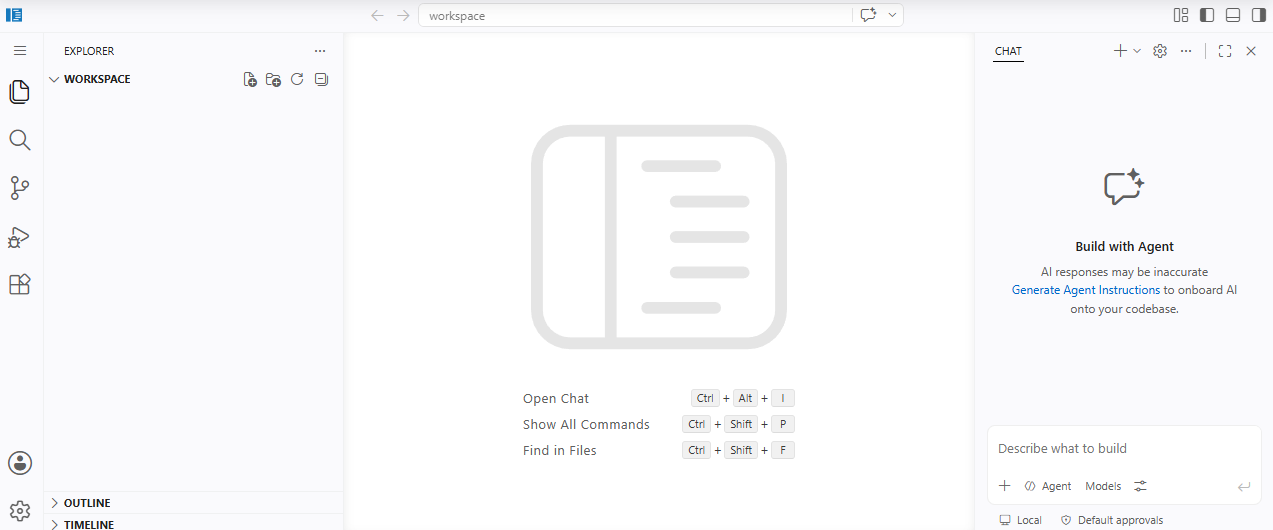
容器之间的互联
Day 3
容器的管理
创建容器
Docker create
[root@localhost ~]# docker create ubuntu
6159145d7e52a88fa09db3114c2e18f252275fa11f310c3df435d91abf1b4147
被创建并没有启动
[root@localhost ~]# docker ps -a
CONTAINER ID   IMAGE     COMMAND                  CREATED          STATUS                   PORTS                                 NAMES
6159145d7e52   ubuntu    "/bin/bash"              40 seconds ago   Created                                                        epic_grothendieck
c040e47a7cf4   ubuntu    "/bin/bash"              4 hours ago      Created                                                        buyao6
44fd0ee7a144   ubuntu    "/bin/bash"              4 hours ago      Exited (0) 4 hours ago                                         wizardly_jang
12a215b6220a   nginx     "/docker-entrypoint.…"   5 hours ago      Up 5 hours               0.0.0.0:80->80/tcp, [::]:80->80/tcp   epic_gagarin
容器只会为一条命令存在
[root@localhost ~]# docker create --name ubuntu666 ubuntu
在启动的时候添加上主动的命名
c64a4e61e7bc92ab236e4a7ebefd0c979f61d02d1977c4e40c5649762fc7d29f
[root@localhost ~]# docker ps -a
CONTAINER ID   IMAGE     COMMAND                  CREATED         STATUS                   PORTS                                 NAMES
c64a4e61e7bc   ubuntu    "/bin/bash"              4 seconds ago   Created                                                        ubuntu666
6159145d7e52   ubuntu    "/bin/bash"              2 minutes ago   Created                                                        epic_grothendieck
c040e47a7cf4   ubuntu    "/bin/bash"              4 hours ago     Created                                                        buyao6
44fd0ee7a144   ubuntu    "/bin/bash"              4 hours ago     Exited (0) 4 hours ago                                         wizardly_jang
12a215b6220a   nginx     "/docker-entrypoint.…"   5 hours ago     Up 5 hours               0.0.0.0:80->80/tcp, [::]:80->80/tcp   epic_gagarin
镜像的运行
[root@localhost ~]# docker run ubuntu cat /etc/os-release
unbuntu 是这个镜像名,unbuntu 后面的都是交给这个容器的核心命令
PRETTY_NAME="Ubuntu 26.04 LTS"
NAME="Ubuntu"
VERSION_ID="26.04"
VERSION="26.04 LTS (Resolute Raccoon)"
VERSION_CODENAME=resolute
ID=ubuntu
ID_LIKE=debian
HOME_URL="https://www.ubuntu.com/"
SUPPORT_URL="https://help.ubuntu.com/"
BUG_REPORT_URL="https://bugs.launchpad.net/ubuntu/"
PRIVACY_POLICY_URL="https://www.ubuntu.com/legal/terms-and-policies/privacy-policy"
UBUNTU_CODENAME=resolute
LOGO=ubuntu-logo
docker run --rm ubuntu cat /etc/os-release
在容器运行完成后,会将自身的记录删除
[root@localhost ~]# docker run --rm ubuntu cat /etc/os-release
PRETTY_NAME="Ubuntu 26.04 LTS"
NAME="Ubuntu"
VERSION_ID="26.04"
VERSION="26.04 LTS (Resolute Raccoon)"
VERSION_CODENAME=resolute
ID=ubuntu
ID_LIKE=debian
HOME_URL="https://www.ubuntu.com/"
SUPPORT_URL="https://help.ubuntu.com/"
BUG_REPORT_URL="https://bugs.launchpad.net/ubuntu/"
PRIVACY_POLICY_URL="https://www.ubuntu.com/legal/terms-and-policies/privacy-policy"
UBUNTU_CODENAME=resolute
LOGO=ubuntu-logo
[root@localhost ~]# docker ps -a
CONTAINER ID   IMAGE     COMMAND   CREATED   STATUS    PORTS     NAMES
[root@localhost ~]# docker run -it ubuntu
进入容器的内部,然后进行ubuntu系统的操作
root@5c6fa43bf4f0:/# apt -y install ping
Error: Unable to locate package ping
root@5c6fa43bf4f0:/# apt -y install inputils-ping
Error: Unable to locate package inputils-ping
root@5c6fa43bf4f0:/# update apt
bash: update: command not found
root@5c6fa43bf4f0:/# apt update
在安装之前首先要将容器中apt进行更新 apt update
Get:1 http://archive.ubuntu.com/ubuntu resolute InRelease [136 kB]
Get:2 http://security.ubuntu.com/ubuntu resolute-security InRelease [137 kB]
Get:3 http://archive.ubuntu.com/ubuntu resolute-updates InRelease [137 kB]
Get:4 http://archive.ubuntu.com/ubuntu resolute-backports InRelease [136 kB]
Get:5 http://archive.ubuntu.com/ubuntu resolute/universe amd64 Packages [20.1 MB]
Get:6 http://archive.ubuntu.com/ubuntu resolute/restricted amd64 Packages [189 kB]
Get:7 http://archive.ubuntu.com/ubuntu resolute/multiverse amd64 Packages [352 kB]
Get:8 http://archive.ubuntu.com/ubuntu resolute/main amd64 Packages [1874 kB]
Get:9 http://archive.ubuntu.com/ubuntu resolute-backports/universe amd64 Packages [567 B]
Error: Release file for http://security.ubuntu.com/ubuntu/dists/resolute-security/InRelease is not valid yet (invalid for another 1d 3h 50min 1s). Updates for this repository will not be applied.
Error: Release file for http://archive.ubuntu.com/ubuntu/dists/resolute-updates/InRelease is not valid yet (invalid for another 1d 4h 12min 14s). Updates for this repository will not be applied.
root@5c6fa43bf4f0:/# apt -y install ping
Package ping is a virtual package provided by:
  inetutils-ping 2:2.7-2ubuntu1
  iputils-ping 3:20250605-1ubuntu1
You should explicitly select one to install.

Error: Package 'ping' has no installation candidate
root@5c6fa43bf4f0:/# apt -y install inetutils-ping
在ubuntu中进行ping功能的命令是inetutils-ping
Installing:
  inetutils-ping

Installing dependencies:
  netbase

Summary:
  Upgrading: 0, Installing: 2, Removing: 0, Not Upgrading: 0
  Download size: 77.5 kB
  Space needed: 244 kB / 11.1 GB available

Get:1 http://archive.ubuntu.com/ubuntu resolute/main amd64 netbase all 6.5build1 [13.0 kB]
Get:2 http://archive.ubuntu.com/ubuntu resolute/universe amd64 inetutils-ping amd64 2:2.7-2ubuntu1 [64.4 kB]
Fetched 77.5 kB in 3s (29.9 kB/s)
debconf: unable to initialize frontend: Dialog
debconf: (No usable dialog-like program is installed, so the dialog based frontend cannot be used. at /usr/share/perl5/Debconf/FrontEnd/Dialog.pm line 79, <STDIN> line 2.)
debconf: falling back to frontend: Readline
debconf: unable to initialize frontend: Readline
debconf: (Can't locate Term/ReadLine.pm in @INC (you may need to install the Term::ReadLine module) (@INC entries checked: /etc/perl /usr/local/lib/x86_64-linux-gnu/perl/5.40.1 /usr/local/share/perl/5.40.1 /usr/lib/x86_64-linux-gnu/perl5/5.40 /usr/share/perl5 /usr/lib/x86_64-linux-gnu/perl-base /usr/lib/x86_64-linux-gnu/perl/5.40 /usr/share/perl/5.40 /usr/local/lib/site_perl) at /usr/share/perl5/Debconf/FrontEnd/Readline.pm line 8, <STDIN> line 2.)
debconf: falling back to frontend: Teletype
Selecting previously unselected package netbase.
(Reading database ... 7724 files and directories currently installed.)
Preparing to unpack .../netbase_6.5build1_all.deb ...
Unpacking netbase (6.5build1) ...
Selecting previously unselected package inetutils-ping.
Preparing to unpack .../inetutils-ping_2%3a2.7-2ubuntu1_amd64.deb ...
Unpacking inetutils-ping (2:2.7-2ubuntu1) ...
Setting up netbase (6.5build1) ...
Setting up inetutils-ping (2:2.7-2ubuntu1) ...
root@5c6fa43bf4f0:/# ping qq.com
PING qq.com (112.60.14.252): 56 data bytes
64 bytes from 112.60.14.252: icmp_seq=0 ttl=127 time=54.206 ms
64 bytes from 112.60.14.252: icmp_seq=1 ttl=127 time=51.494 ms
64 bytes from 112.60.14.252: icmp_seq=2 ttl=127 time=48.860 ms
64 bytes from 112.60.14.252: icmp_seq=3 ttl=127 time=48.515 ms
64 bytes from 112.60.14.252: icmp_seq=4 ttl=127 time=97.111 ms
^C--- qq.com ping statistics ---
5 packets transmitted, 5 packets received, 0% packet loss
round-trip min/avg/max/stddev = 48.515/60.037/97.111/18.650 ms
docker run -P -itd ubuntu 指定如何映射本地的端口
[root@localhost ~]# docker run -P -itd ubuntu
c44978b2d344ec2795c9abf2efc34a4d7ce2bbddcd59e88a34d149fba037bd7b
[root@localhost ~]# docker ps -a
CONTAINER ID   IMAGE     COMMAND       CREATED          STATUS                            PORTS     NAMES
c44978b2d344   ubuntu    "/bin/bash"   11 seconds ago   Up 10 seconds                               bold_chaum
5c6fa43bf4f0   ubuntu    "/bin/bash"   10 minutes ago   Exited (127) About a minute ago             inspiring_chatterjee
58a9dba98120   ubuntu    "/bin/bash"   12 minutes ago   Exited (127) 12 minutes ago                 flamboyant_sutherland
[root@localhost ~]# docker exec -it c44978b2d344 bash
root@c44978b2d344:/# ps aux
USER         PID %CPU %MEM    VSZ   RSS TTY      STAT START   TIME COMMAND
root           1  0.0  0.1   4768  4164 pts/0    Ss+  21:34   0:00 /bin/bash
root           7  0.2  0.1   4768  4144 pts/1    Ss   21:37   0:00 bash
root          14  0.0  0.1   6752  4112 pts/1    R+   21:37   0:00 ps aux
root@c44978b2d344:/# python3 -m http.server
Serving HTTP on 0.0.0.0 port 8000 (http://0.0.0.0:8000/) ...
[root@localhost ~]# docker exec -it c44978b2d344 bash
root@c44978b2d344:/# ps aux
USER         PID %CPU %MEM    VSZ   RSS TTY      STAT START   TIME COMMAND
root           1  0.0  0.1   4768  4164 pts/0    Ss+  21:34   0:00 /bin/bash
root           7  0.2  0.1   4768  4144 pts/1    Ss   21:37   0:00 bash
root          14  0.0  0.1   6752  4112 pts/1    R+   21:37   0:00 ps aux
root@c44978b2d344:/#
root@c44978b2d344:/#
root@c44978b2d344:/#
root@c44978b2d344:/# apt update
Get:1 http://security.ubuntu.com/ubuntu resolute-security InRelease [137 kB]
Get:2 http://archive.ubuntu.com/ubuntu resolute InRelease [136 kB]
Get:3 http://archive.ubuntu.com/ubuntu resolute-updates InRelease [137 kB]
Get:4 http://archive.ubuntu.com/ubuntu resolute-backports InRelease [136 kB]
Get:5 http://archive.ubuntu.com/ubuntu resolute/multiverse amd64 Packages [352 kB]
Get:6 http://archive.ubuntu.com/ubuntu resolute/restricted amd64 Packages [189 kB]
Get:7 http://archive.ubuntu.com/ubuntu resolute/universe amd64 Packages [20.1 MB]
Get:8 http://archive.ubuntu.com/ubuntu resolute/main amd64 Packages [1874 kB]
Get:9 http://archive.ubuntu.com/ubuntu resolute-backports/universe amd64 Packages [567 B]
Error: Release file for http://security.ubuntu.com/ubuntu/dists/resolute-security/InRelease is not valid yet (invalid for another 1d 3h 35min 10s). Updates for this repository will not be applied.
Error: Release file for http://archive.ubuntu.com/ubuntu/dists/resolute-updates/InRelease is not valid yet (invalid for another 1d 3h 57min 22s). Updates for this repository will not be applied.
root@c44978b2d344:/# apt -y install python3
Installing:
  python3

Installing dependencies:
  ca-certificates  libpython3-stdlib      libreadline8t64  netbase          python3.14          tzdata
  libexpat1        libpython3.14-minimal  libsqlite3-0     openssl          python3.14-minimal
  libffi8          libpython3.14-stdlib   media-types      python3-minimal  readline-common

Suggested packages:
  python3-doc  python3-venv     python3.14-doc  binfmt-support
  python3-tk   python3.14-venv  binutils        readline-doc

Summary:
  Upgrading: 0, Installing: 17, Removing: 0, Not Upgrading: 0
  Download size: 9495 kB
  Space needed: 32.3 MB / 11.0 GB available

Get:1 http://archive.ubuntu.com/ubuntu resolute/main amd64 libexpat1 amd64 2.7.4-1 [94.0 kB]
Get:2 http://archive.ubuntu.com/ubuntu resolute/main amd64 libpython3.14-minimal amd64 3.14.4-1 [916 kB]
Get:3 http://archive.ubuntu.com/ubuntu resolute/main amd64 python3.14-minimal amd64 3.14.4-1 [2579 kB]
Get:4 http://archive.ubuntu.com/ubuntu resolute/main amd64 python3-minimal amd64 3.14.3-0ubuntu2 [25.8 kB]
Get:5 http://archive.ubuntu.com/ubuntu resolute/main amd64 media-types all 14.0.0build1 [31.4 kB]
Get:6 http://archive.ubuntu.com/ubuntu resolute/main amd64 netbase all 6.5build1 [13.0 kB]
Get:7 http://archive.ubuntu.com/ubuntu resolute/main amd64 tzdata all 2026a-3ubuntu1 [194 kB]
Get:8 http://archive.ubuntu.com/ubuntu resolute/main amd64 libffi8 amd64 3.5.2-4 [26.3 kB]
Get:9 http://archive.ubuntu.com/ubuntu resolute/main amd64 readline-common all 8.3-4 [61.5 kB]
Get:10 http://archive.ubuntu.com/ubuntu resolute/main amd64 libreadline8t64 amd64 8.3-4 [164 kB]
Get:11 http://archive.ubuntu.com/ubuntu resolute/main amd64 libsqlite3-0 amd64 3.46.1-9 [722 kB]
Get:12 http://archive.ubuntu.com/ubuntu resolute/main amd64 libpython3.14-stdlib amd64 3.14.4-1 [2406 kB]
Get:13 http://archive.ubuntu.com/ubuntu resolute/main amd64 python3.14 amd64 3.14.4-1 [830 kB]
Get:14 http://archive.ubuntu.com/ubuntu resolute/main amd64 libpython3-stdlib amd64 3.14.3-0ubuntu2 [8476 B]
Get:15 http://archive.ubuntu.com/ubuntu resolute/main amd64 python3 amd64 3.14.3-0ubuntu2 [22.9 kB]
Get:16 http://archive.ubuntu.com/ubuntu resolute/main amd64 openssl amd64 3.5.5-1ubuntu3 [1243 kB]
Get:17 http://archive.ubuntu.com/ubuntu resolute/main amd64 ca-certificates all 20260223 [158 kB]
Fetched 9495 kB in 5s (1774 kB/s)
debconf: unable to initialize frontend: Dialog
debconf: (No usable dialog-like program is installed, so the dialog based frontend cannot be used. at /usr/share/perl5/Debconf/FrontEnd/Dialog.pm line 79, <STDIN> line 17.)
debconf: falling back to frontend: Readline
debconf: unable to initialize frontend: Readline
debconf: (Can't locate Term/ReadLine.pm in @INC (you may need to install the Term::ReadLine module) (@INC entries checked: /etc/perl /usr/local/lib/x86_64-linux-gnu/perl/5.40.1 /usr/local/share/perl/5.40.1 /usr/lib/x86_64-linux-gnu/perl5/5.40 /usr/share/perl5 /usr/lib/x86_64-linux-gnu/perl-base /usr/lib/x86_64-linux-gnu/perl/5.40 /usr/share/perl/5.40 /usr/local/lib/site_perl) at /usr/share/perl5/Debconf/FrontEnd/Readline.pm line 8, <STDIN> line 17.)
debconf: falling back to frontend: Teletype
Preconfiguring packages ...
Configuring tzdata
------------------

Please select the geographic area in which you live. Subsequent configuration questions will narrow this down by
presenting a list of cities, representing the time zones in which they are located.

  1. Africa   3. Antarctica  5. Asia      7. Australia  9. Indian    11. Etc
  2. America  4. Arctic      6. Atlantic  8. Europe     10. Pacific
Geographic area: 5

Please select the city or region corresponding to your time zone.

  1. Aden      16. Brunei       31. Hovd          46. Kuching       61. Qatar          76. Thimphu
  2. Almaty    17. Chita        32. Irkutsk       47. Kuwait        62. Qostanay       77. Tokyo
  3. Amman     18. Chongqing    33. Istanbul      48. Macau         63. Qyzylorda      78. Tomsk
  4. Anadyr    19. Colombo      34. Jakarta       49. Magadan       64. Riyadh         79. Ulaanbaatar
  5. Aqtau     20. Damascus     35. Jayapura      50. Makassar      65. Sakhalin       80. Urumqi
  6. Aqtobe    21. Dhaka        36. Jerusalem     51. Manila        66. Samarkand      81. Ust-Nera
  7. Ashgabat  22. Dili         37. Kabul         52. Muscat        67. Seoul          82. Vientiane
  8. Atyrau    23. Dubai        38. Kamchatka     53. Nicosia       68. Shanghai       83. Vladivostok
  9. Baghdad   24. Dushanbe     39. Karachi       54. Novokuznetsk  69. Singapore      84. Yakutsk
  10. Bahrain  25. Famagusta    40. Kashgar       55. Novosibirsk   70. Srednekolymsk  85. Yangon
  11. Baku     26. Gaza         41. Kathmandu     56. Omsk          71. Taipei         86. Yekaterinburg
  12. Bangkok  27. Harbin       42. Khandyga      57. Oral          72. Tashkent       87. Yerevan
  13. Barnaul  28. Hebron       43. Kolkata       58. Phnom_Penh    73. Tbilisi
[More] 68

  14. Beirut   29. Ho_Chi_Minh  44. Krasnoyarsk   59. Pontianak     74. Tehran
  15. Bishkek  30. Hong_Kong    45. Kuala_Lumpur  60. Pyongyang     75. Tel_Aviv
Time zone: 68

Selecting previously unselected package libexpat1:amd64.
(Reading database ... 7724 files and directories currently installed.)
Preparing to unpack .../libexpat1_2.7.4-1_amd64.deb ...
Unpacking libexpat1:amd64 (2.7.4-1) ...
Selecting previously unselected package libpython3.14-minimal:amd64.
Preparing to unpack .../libpython3.14-minimal_3.14.4-1_amd64.deb ...
Unpacking libpython3.14-minimal:amd64 (3.14.4-1) ...
Selecting previously unselected package python3.14-minimal.
Preparing to unpack .../python3.14-minimal_3.14.4-1_amd64.deb ...
Unpacking python3.14-minimal (3.14.4-1) ...
Setting up libpython3.14-minimal:amd64 (3.14.4-1) ...
Setting up libexpat1:amd64 (2.7.4-1) ...
Setting up python3.14-minimal (3.14.4-1) ...
Selecting previously unselected package python3-minimal.
(Reading database ... 8078 files and directories currently installed.)
Preparing to unpack .../00-python3-minimal_3.14.3-0ubuntu2_amd64.deb ...
Unpacking python3-minimal (3.14.3-0ubuntu2) ...
Selecting previously unselected package media-types.
Preparing to unpack .../01-media-types_14.0.0build1_all.deb ...
Unpacking media-types (14.0.0build1) ...
Selecting previously unselected package netbase.
Preparing to unpack .../02-netbase_6.5build1_all.deb ...
Unpacking netbase (6.5build1) ...
Selecting previously unselected package tzdata.
Preparing to unpack .../03-tzdata_2026a-3ubuntu1_all.deb ...
Unpacking tzdata (2026a-3ubuntu1) ...
Selecting previously unselected package libffi8:amd64.
Preparing to unpack .../04-libffi8_3.5.2-4_amd64.deb ...
Unpacking libffi8:amd64 (3.5.2-4) ...
Selecting previously unselected package readline-common.
Preparing to unpack .../05-readline-common_8.3-4_all.deb ...
Unpacking readline-common (8.3-4) ...
Selecting previously unselected package libreadline8t64:amd64.
Preparing to unpack .../06-libreadline8t64_8.3-4_amd64.deb ...
Adding 'diversion of /lib/x86_64-linux-gnu/libhistory.so.8 to /lib/x86_64-linux-gnu/libhistory.so.8.usr-is-merged by libreadline8t64'
Adding 'diversion of /lib/x86_64-linux-gnu/libhistory.so.8.2 to /lib/x86_64-linux-gnu/libhistory.so.8.2.usr-is-merged by libreadline8t64'
Adding 'diversion of /lib/x86_64-linux-gnu/libreadline.so.8 to /lib/x86_64-linux-gnu/libreadline.so.8.usr-is-merged by libreadline8t64'
Adding 'diversion of /lib/x86_64-linux-gnu/libreadline.so.8.2 to /lib/x86_64-linux-gnu/libreadline.so.8.2.usr-is-merged by libreadline8t64'
Unpacking libreadline8t64:amd64 (8.3-4) ...
Selecting previously unselected package libsqlite3-0:amd64.
Preparing to unpack .../07-libsqlite3-0_3.46.1-9_amd64.deb ...
Unpacking libsqlite3-0:amd64 (3.46.1-9) ...
Selecting previously unselected package libpython3.14-stdlib:amd64.
Preparing to unpack .../08-libpython3.14-stdlib_3.14.4-1_amd64.deb ...
Unpacking libpython3.14-stdlib:amd64 (3.14.4-1) ...
Selecting previously unselected package python3.14.
Preparing to unpack .../09-python3.14_3.14.4-1_amd64.deb ...
Unpacking python3.14 (3.14.4-1) ...
Selecting previously unselected package libpython3-stdlib:amd64.
Preparing to unpack .../10-libpython3-stdlib_3.14.3-0ubuntu2_amd64.deb ...
Unpacking libpython3-stdlib:amd64 (3.14.3-0ubuntu2) ...
Setting up python3-minimal (3.14.3-0ubuntu2) ...
Selecting previously unselected package python3.
(Reading database ... 9109 files and directories currently installed.)
Preparing to unpack .../python3_3.14.3-0ubuntu2_amd64.deb ...
Unpacking python3 (3.14.3-0ubuntu2) ...
Selecting previously unselected package openssl.
Preparing to unpack .../openssl_3.5.5-1ubuntu3_amd64.deb ...
Unpacking openssl (3.5.5-1ubuntu3) ...
Selecting previously unselected package ca-certificates.
Preparing to unpack .../ca-certificates_20260223_all.deb ...
Unpacking ca-certificates (20260223) ...
Setting up media-types (14.0.0build1) ...
Setting up libsqlite3-0:amd64 (3.46.1-9) ...
Setting up tzdata (2026a-3ubuntu1) ...
debconf: unable to initialize frontend: Dialog
debconf: (No usable dialog-like program is installed, so the dialog based frontend cannot be used. at /usr/share/perl5/Debconf/FrontEnd/Dialog.pm line 79.)
debconf: falling back to frontend: Readline
debconf: unable to initialize frontend: Readline
debconf: (Can't locate Term/ReadLine.pm in @INC (you may need to install the Term::ReadLine module) (@INC entries checked: /etc/perl /usr/local/lib/x86_64-linux-gnu/perl/5.40.1 /usr/local/share/perl/5.40.1 /usr/lib/x86_64-linux-gnu/perl5/5.40 /usr/share/perl5 /usr/lib/x86_64-linux-gnu/perl-base /usr/lib/x86_64-linux-gnu/perl/5.40 /usr/share/perl/5.40 /usr/local/lib/site_perl) at /usr/share/perl5/Debconf/FrontEnd/Readline.pm line 8.)
debconf: falling back to frontend: Teletype

Current default time zone: 'Asia/Shanghai'
Local time is now:      Mon Aug 10 05:47:16 CST 2026.
Universal Time is now:  Sun Aug  9 21:47:16 UTC 2026.
Run 'dpkg-reconfigure tzdata' if you wish to change it.

Setting up libffi8:amd64 (3.5.2-4) ...
Setting up netbase (6.5build1) ...
Setting up openssl (3.5.5-1ubuntu3) ...
Setting up readline-common (8.3-4) ...
Setting up ca-certificates (20260223) ...
debconf: unable to initialize frontend: Dialog
debconf: (No usable dialog-like program is installed, so the dialog based frontend cannot be used. at /usr/share/perl5/Debconf/FrontEnd/Dialog.pm line 79.)
debconf: falling back to frontend: Readline
debconf: unable to initialize frontend: Readline
debconf: (Can't locate Term/ReadLine.pm in @INC (you may need to install the Term::ReadLine module) (@INC entries checked: /etc/perl /usr/local/lib/x86_64-linux-gnu/perl/5.40.1 /usr/local/share/perl/5.40.1 /usr/lib/x86_64-linux-gnu/perl5/5.40 /usr/share/perl5 /usr/lib/x86_64-linux-gnu/perl-base /usr/lib/x86_64-linux-gnu/perl/5.40 /usr/share/perl/5.40 /usr/local/lib/site_perl) at /usr/share/perl5/Debconf/FrontEnd/Readline.pm line 8.)
debconf: falling back to frontend: Teletype
Updating certificates in /etc/ssl/certs...
144 added, 0 removed; done.
Setting up libreadline8t64:amd64 (8.3-4) ...
Setting up libpython3.14-stdlib:amd64 (3.14.4-1) ...
Setting up python3.14 (3.14.4-1) ...
Setting up libpython3-stdlib:amd64 (3.14.3-0ubuntu2) ...
Setting up python3 (3.14.3-0ubuntu2) ...
running python rtupdate hooks for python3.14...
running python post-rtupdate hooks for python3.14...
Processing triggers for libc-bin (2.43-2ubuntu2) ...
Processing triggers for ca-certificates (20260223) ...
Updating certificates in /etc/ssl/certs...
0 added, 0 removed; done.
Running hooks in /etc/ca-certificates/update.d...
done.
root@c44978b2d344:/# python3 -m http.server
Serving HTTP on 0.0.0.0 port 8000 (http://0.0.0.0:8000/) ...


^C
Keyboard interrupt received, exiting.
root@c44978b2d344:/# eixt
bash: eixt: command not found
root@c44978b2d344:/# exit
exit
docker rm -f $(docker ps -aq) 彻底清除所有的容器
停止所有容器
docker stop ....  可能会停不下来
docker start ....
docker kill ....
删除容器
docker rm .....
docker rm -f .....
//
查看所有的序列号,并列出来
docker ps -aq
docker rm -f `docker ps -qa`
用来删除所有的容器,生产环境严禁使用,数据不一定会丢失,但是服务会停止
导入导出容器
docker import
不建议使用,导出的镜像过于臃肿
重新开始一个容器
docker run -it ubuntu
apt update
apt -y install iputils-ping
apt -y install vim
apt -y install openssh-server
vim /etc/ssh/sshd-config
yes
exit
/usr/sbin/sshd
ssh
ps aux
apt -y install net-tools
netstat -ano
eixt   //退出镜像
docker ps -a
docker export -o myubuntu.tar 4c2872d0d9b4
ll -h
gzip myubuntu.tar
docker import myubuntu.tar.gz myubuntu:26.04
docker images
用自己的电脑进行镜像的连接
docker run -d -p 8022:22 myubuntu:26.04 /usr/sbin/sshd -D
docker ps -a
ip a
使用自己电脑的cmd
ssh root@192.168.163.141 -p 8022
构建镜像
docker ps -a
[root@localhost ~]# docker ps -a
CONTAINER ID   IMAGE            COMMAND               CREATED        STATUS                    PORTS                                     NAMES
cbcfcb67dcd7   myubuntu:26.04   "/usr/sbin/sshd -D"   12 hours ago   Up 12 hours               0.0.0.0:8022->22/tcp, [::]:8022->22/tcp   cranky_newton
4c2872d0d9b4   ubuntu           "/bin/bash"           13 hours ago   Exited (0) 12 hours ago                                             confident_allen
[root@localhost ~]# docker ps -a
CONTAINER ID   IMAGE            COMMAND               CREATED        STATUS                    PORTS                                     NAMES
cbcfcb67dcd7   myubuntu:26.04   "/usr/sbin/sshd -D"   12 hours ago   Up 12 hours               0.0.0.0:8022->22/tcp, [::]:8022->22/tcp   cranky_newton
4c2872d0d9b4   ubuntu           "/bin/bash"           13 hours ago   Exited (0) 12 hours ago                                             confident_allen
查看所有的镜像
docker exec -it cbc bash    //进入这个镜像
root@cbcfcb67dcd7:/# apt -y install iproute2
apt update
apt -y install iproute2
ss -ntl
查看端口
root@cbcfcb67dcd7:/# ss -ntl
State          Recv-Q         Send-Q                 Local Address:Port                 Peer Address:Port
LISTEN         0              128                          0.0.0.0:22                        0.0.0.0:*
LISTEN         0              128                             [::]:22                           [::]:*
exit
把一个正在运行或者已经停止的容器的当前状态打包成一个新的镜像
docker commit -a "lyq" -m "my ubuntu image v1" cbcfcb67dcd7  myubuntu:v1
-a 作者 -m 提交说明 容器id 镜像名:标签
docker run -d -p 8023:22   myubuntu:v1 /usr/sbin/sshd -D
Docker file 指令
FROM ubuntu:26.04
RUN apt update \
    && apt install -y vim net-tools openssh-server iputils ping iproute2 \
    && sed -i "s/#PermitRootLogin/" /etc/ssh/sshd_config \
    && echo 'root:1' | sudo chpasswd \
    && apt clean
EXPOSE 22,8000
完整版
FROM ubuntu:26.04

ENV DEBIAN_FRONTEND=noninteractive
ENV TZ=Asia/Shanghai
ENV APP_VERSION=v1.0

RUN apt update \
    && ln -snf /usr/share/zoneinfo/$TZ /etc/localtime \
    && echo "$TZ" > /etc/timezone \
    && apt install -y vim net-tools openssh-server iputils-ping iproute2 python3 \
    && sed -i "s/#PermitRootLogin/PermitRootLogin/" /etc/ssh/sshd_config \
    && echo 'root:1' | chpasswd \
    && apt clean

EXPOSE 22 8000

CMD ["/usr/sbin/sshd", "-D"]
增强版
FROM ubuntu:26.04

ENV DEBIAN_FRONTEND=noninteractive
ENV TZ=Asia/Shanghai
ENV APP_VERSION=v1.0

RUN apt update \
    && ln -snf /usr/share/zoneinfo/$TZ /etc/localtime \
    && echo "$TZ" > /etc/timezone \
    && apt install -y --no-install-recommends \
        vim \
        net-tools \
        iproute2 \
        iputils-ping \
        openssh-server \
        python3 \
    && mkdir -p /run/sshd \
    && sed -i 's/#PermitRootLogin prohibit-password/PermitRootLogin yes/' /etc/ssh/sshd_config \
    && echo 'root:1' | chpasswd \
    && apt clean \
    && rm -rf /var/lib/apt/lists/*

EXPOSE 22 8000

CMD ["/usr/sbin/sshd", "-D"]
vim dockerfile
    mkdir myubuntu
    mv docker file myubuntu
    docker build -t myubuntu:v2 /root/myubuntu
    在构建好容器后进行进入
    docker run -d -P myubuntu:v2
    [root@localhost myubuntu]# docker run -d -P myubuntu:v2
6cf7344dda2bd7a79087260c16031ccad7ed620df9fd3b9be908e5f8b866016f
[root@localhost myubuntu]# docker ps -a
CONTAINER ID   IMAGE            COMMAND               CREATED         STATUS                       PORTS                                                                                      NAMES
6cf7344dda2b   myubuntu:v2      "/usr/sbin/sshd -D"   7 seconds ago   Up 6 seconds                 0.0.0.0:32768->22/tcp, [::]:32768->22/tcp, 0.0.0.0:32769->8000/tcp, [::]:32769->8000/tcp   gracious_wiles
c424a56d93be   myubuntu:v1      "/usr/sbin/sshd -D"   11 hours ago    Exited (255) 8 minutes ago   0.0.0.0:8023->22/tcp, [::]:8023->22/tcp                                                    elegant_wiles
cbcfcb67dcd7   myubuntu:26.04   "/usr/sbin/sshd -D"   24 hours ago    Exited (0) 11 hours ago                                                                                                 cranky_newton
4c2872d0d9b4   ubuntu           "/bin/bash"           24 hours ago    Exited (0) 24 hours ago                                                                                                 confident_allen


在本地的电脑终端中进行连接
ssh root@192.168.163.141 -p 32768
连接这个端口
C:\Users\15162>ssh root@192.168.163.141 -p 32769
ssh: connect to host 192.168.163.141 port 32769: Connection refused

C:\Users\15162>ssh root@192.168.163.141 -p 32768
The authenticity of host '[192.168.163.141]:32768 ([192.168.163.141]:32768)' can't be established.
ED25519 key fingerprint is SHA256:nZGCFz0fD8d/yRNFEOpO9C+mTYoIk8I/7q9dvlfTqNk.
This key is not known by any other names.
Are you sure you want to continue connecting (yes/no/[fingerprint])? yes
Warning: Permanently added '[192.168.163.141]:32768' (ED25519) to the list of known hosts.
root@192.168.163.141's password:
Welcome to Ubuntu 26.04 LTS (GNU/Linux 5.14.0-687.17.1.el9_8.x86_64 x86_64)

 * Documentation:  https://docs.ubuntu.com
 * Management:     https://landscape.canonical.com
 * Support:        https://ubuntu.com/pro

This system has been minimized by removing packages and content that are
not required on a system that users do not log into.

To restore this content, you can run the 'unminimize' command.

The programs included with the Ubuntu system are free software;
the exact distribution terms for each program are described in the
individual files in /usr/share/doc/*/copyright.

Ubuntu comes with ABSOLUTELY NO WARRANTY, to the extent permitted by
applicable law.

root@6cf7344dda2b:~#
成功连接容器
docker的数据管理
Docker OOM Kiler 内存管理
Docker 容器资源限制与 OOM 异常处理
容器资源限制
默认情况下,容器没有资源限制,可以使用主机内核调度程序允许的尽可能多的给定资源。Docker 提供了控制容器可以使用多少内存或者 CPU 的方法,通过设置 docker run 命令的运行时配置标志来实现。
其中一些功能要求宿主机的内核支持 Linux 功能。要检查支持情况,可以使用 docker info 命令。如果内核中禁用了某项功能,可能会在输出结尾处看到警告。
OOM 异常
对于 Linux 主机,如果没有足够的内存来执行其他重要的系统任务,将会抛出 OOM 异常(内存溢出、内存泄漏、内存异常)。随后系统会开始杀死进程以释放内存,凡是运行在宿主机上的进程都有可能被 kill,包括 dockerd 和其他的应用程序。如果重要的系统进程被 kill,会导致和该进程相关的服务全部宕机。
产生 OOM 异常时,dockerd 会尝试通过调整 Docker 守护程序上的 OOM 优先级来减轻这些风险,以便它比系统上的其他进程更不可能被杀死。但是,容器的 OOM 优先级未调整时,单个容器被杀死的可能性更大(不推荐调整容器的优先级这种方式)。
Linux 进程 OOM 评分机制
Linux 会为每个进程计算一个分数,最终它会将分数最高的进程 kill 掉。相关文件说明如下:
/proc/PID/oom_score_adj
范围为 -1000 到 1000。
值越高越容易被宿主机 kill 掉。
如果将该值设置为 -1000,则进程永远不会被宿主机 kernel kill。
/proc/PID/oom_adj
范围为 -17 到 +15。
取值越高越容易被干掉。
如果是 -17,则表示不能被 kill。
该设置参数的存在是为了和旧版本的 Linux 内核兼容。
/proc/PID/oom_score
这个值是系统综合进程的内存消耗量、CPU 时间(utime + stime)、存活时间(uptime - start time)和 oom_adj 计算出的进程得分。
消耗内存越多得分越高,越容易被宿主机 kernel 强制杀死。
容器的内存限制
Docker可以强制执行硬性内存限制,即只允许容器使用给定的内存大小
Docker也可以执行非硬性内存限制,即容器可以使用尽可能多的内存,除非内核检测到主机上的内存不够用了
[root@localhost ~]# docker run -it --rm --name test1 tylersmith22/docker-stress-ng --vm 2 --vm-bytes 256m
进行内存的限制和cpu核心的限制
限制内存
-m 最小值 4m
示例
docker run -m 512m my_image
容器部署坦克大战
cd opt
mkdir tank
cd tank/
rz
unzip
拉去python的镜像库
docker pull python:3.12.0
vim Dockerfile
FROM python:3.12.0
ADD tank /opt/tank
WORKDIR /opt/tank
RUN pip config set global.index-url https://pypi.tuna.tsinghua.edu.cn/simple \
    && pip install --no-cache-dir requests flask flask-socketio eventlet
EXPOSE 5000
CMD ["python3", "app.py"]
eixt
docker logs tank
实战演习
负载均衡
示例一:
实现企业服务负载均衡
所需镜像:nginx,php
1.创建镜像
docker run -d -p 8081:80 --name web01 nginx:latest
docker run -d -p 8082:80 --name web02 nginx:latest
docker run -d -p 8083:80 --name web03 nginx:latest
docker exec web01 sh -c 'echo "web01" > /usr/share/nginx/html/index.html'
docker exec web02 sh -c 'echo "web02" > /usr/share/nginx/html/index.html'
docker exec web03 sh -c 'echo "web03" > /usr/share/nginx/html/index.html'
修改网站首页的内容
192.168.163.141
2.创建LB01容器
将原本的配置复制到外面
创建文件夹
mkdir -p /opt/lnmp/lb01 /opt/lnmp/lb02
docker run -d --rm -v /opt/lnmp/lb01:/data nginx:latest cp -r /etc/nginx/.data
docker run -d --rm -v /opt/lnmp/lb02:/data nginx:latest cp -r /etc/nginx/.data
cat /opt/lnmp/lb01/nginx.conf
# 注释掉http模块中的include命令
# 在最后追加
stream {
    upstream web_cluster {
        # 轮询策略(rr是默认值,按顺序分发)
        server web01:80;
        server web02:80;
        server web03:80;
    }
    server {
        listen 80;
        proxy_pass web_cluster;

        # 后端连接超时
        proxy_connect_timeout 3s;
        # 后端响应超时
        proxy_timeout 600s;
    }
}
docker run -d --restart always \
-p 80:80 \
 -v lb01:/etc/nginx \
--link web01:web01 \
--link web02:web02 \
--link web03:web03 \
nginx:latest
docker rm -f lb01
docker run -d --restart always
-p 80:80
-- name lb01
-v /opt/lnmp/lb01:/etc/nginx
--link web01:web01
--link web02:web02
--link web03:web03
--name lb01
nginx:latest
docker rm -f lb01
docker run -d --restart=always \
-p 80:80 \
--name lb01 \
-v `pwd`/lb01:/etc/nginx \
--link web01:web01 \
--link web02:web02 \
--link web03:web03 \
nginx:latest
3.web服务器
Nginx 的web服务器,需要将配置文件,以及源码挂载
docker run -d --rm -v /opt/lnmp/blog/nginx:/data nginx:latest cp -r /etc/nginx/. /data
启动nginx服务
docker run -d \
--name web01 \
-v `pwd`/blog/nginx:/etc/nginx \
-v `pwd`/blog/www:/usr/share/nginx/html/ \
nginx:latest


cat run.sh
#=====web01-03====
docker rm -f web01
docker rm -f web02
docker rm -f web03

docker run -d --restart=always \
        --name web01 \
        -v `pwd`/blog/nginx:/etc/nginx \
        -v `pwd`/blog/www:/usr/share/nginx/html/ \
        nginx:latest

docker run -d --restart=always \
        --name web02 \
        -v `pwd`/blog/nginx:/etc/nginx \
        -v `pwd`/blog/www:/usr/share/nginx/html/ \
        nginx:latest

docker run -d --restart=always \
        --name web03 \
        -v `pwd`/blog/nginx:/etc/nginx \
        -v `pwd`/blog/www:/usr/share/nginx/html/ \
        nginx:latest

sleep 3
#=====LB01=====
docker rm -f lb01
docker run -d --restart=always \
        -p 80:80 \
        --name lb01 \
        -v `pwd`/lb01:/etc/nginx \
        --link web01:web01 \
        --link web02:web02 \
        --link web03:web03 \
        nginx:latest